December 28, 2025 · Kuba Rogut
Ever wonder what makes a good game truly great? It’s more than just flashy graphics or addictive gameplay. The real magic, the secret sauce that pulls you in and doesn't let go, is often the sound.
This guide is your starting point for understanding game audio. We're not just talking about background noise; we're talking about the art of using sound to build worlds, tell stories, and make every moment feel real. Getting these fundamentals right is the first big step toward creating games that people remember long after they’ve put the controller down.
Think back to the last game that truly hooked you. Sure, you remember the epic boss fights and the stunning landscapes. But what about the subtle creak of a floorboard that warned you of an enemy, or the triumphant swell of music after a tough victory? That’s the power of sound.
Audio is one of the most powerful tools a game developer has. It's an invisible layer of communication that turns a bunch of pixels into a place you can believe in. It guides your instincts, builds an emotional connection to the story, and gives you crucial feedback that visuals alone just can't match.
At its core, game audio is built on three fundamental components. They all work together, but each has a specific job to do.
To make this crystal clear, here’s a quick breakdown of how these pillars function in a typical game.
| Audio Pillar | Primary Function | Example in a Game |
|---|---|---|
| Sound Effects (SFX) | Provides immediate feedback for player actions and world events. | The thwip of a web-shooter in Spider-Man or the ping of a headshot in Valorant. |
| Music | Sets the emotional tone and pace of the experience. | The epic, orchestral score during a dragon fight in Skyrim. |
| Voice-Over (VO) | Delivers narrative, builds character, and provides information. | The constant radio chatter from allies in a Call of Duty mission. |
These three elements are the foundation upon which immersive, memorable game worlds are built.
Sound design is the art of illusion. A great sound designer can make a player feel the weight of a giant's footsteps or the chill of an empty hallway using nothing but carefully crafted audio cues.
The skills you’re about to learn aren't just for passion projects. Game audio has exploded from a niche role into a massive industry. One report valued the market at $0.28 billion, with projections showing it could hit $0.68 billion by 2033.
This incredible growth means there’s a real demand for people who know how to create amazing audio experiences. You can dive deeper into the market's trajectory and what it means for creators to see just how big the opportunity is.
Understanding these game audio basics for beginners is your ticket into this exciting field. It all starts with learning how sound in games works.
If you want to create audio for games, the first and most important shift you need to make is learning to listen actively. Stop being just a player who hears things and start thinking about why you're hearing them. Every single sound in a game—from the softest footstep to the loudest explosion—is a deliberate choice. It's not just about what's cool; it's about what feels right for the world, the story, and the person holding the controller.
Getting into that mindset starts with one core idea: some sounds exist for the character, and some sounds exist only for the player. Once you grasp this distinction, you've laid the foundation for everything else.
Let's break this down with a classic example. Picture yourself playing a survival horror game. You’re sneaking through a grimy, rain-slicked alley. You hear your character's shaky breathing, the squelch of their boots in a puddle, and the clatter of a tin can they just kicked.
All of those sounds are happening inside the game's world. Your character hears them, and so do you. That's what we call diegetic sound.
But then, as a zombie shambles around the corner, a tense, screeching violin score starts to build. Your character has no clue there's music playing—they're too busy trying not to get eaten. That music is just for you, the player, to crank up the tension. This is non-diegetic sound.
Diegetic Sound: Anything that originates from within the game's world. Think character dialogue, footsteps, gunshots, or the wind howling through trees. Its main job is to build a believable, immersive reality.
Non-Diegetic Sound: Anything the characters can't hear. This includes the background music, user interface (UI) clicks when you navigate a menu, or that little jingle when you unlock an achievement. Its purpose is to guide your emotions and give you important feedback.
Mastering the blend between these two is where the magic happens. You're building a realistic world with one hand while directly manipulating the player's feelings with the other.
"A great game audio experience is one where the player doesn't consciously notice the individual sounds. Instead, they just feel them—the tension, the relief, the satisfaction. The sound becomes part of their instinct."
Okay, so you understand the difference between sounds for the character and sounds for the player. Now, how do we actually make those sounds impactful? Sound designers rely on a handful of core techniques to shape raw audio into memorable moments. Think of these less as complicated engineering principles and more as artistic tools.
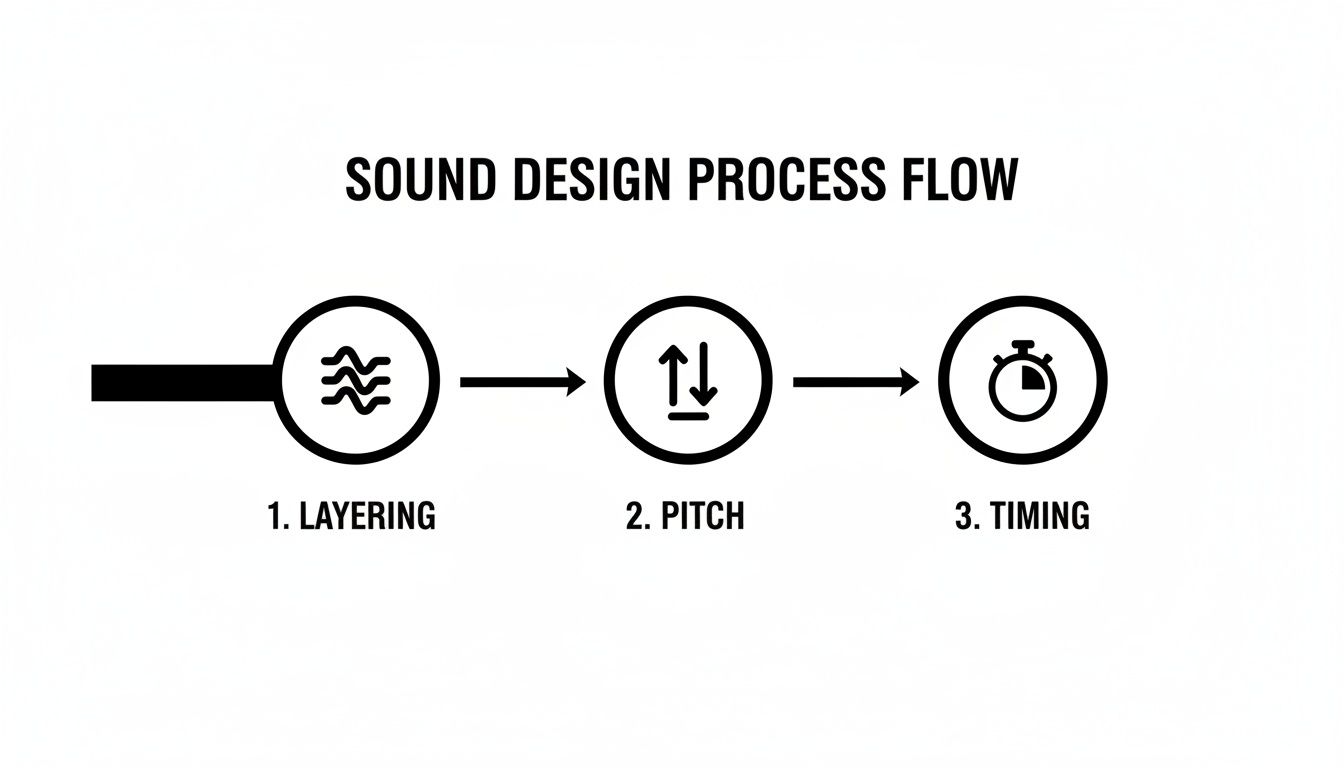
It’s a bit like cooking. You start with raw ingredients (your sound files), but it’s the techniques—slicing, searing, seasoning—that turn them into something special. For us, the most fundamental techniques are layering, pitch, and timing.
Here’s a secret: that huge, cinematic explosion you just heard? It wasn’t a single sound file. Almost no professional sound effect is. Instead, it’s a carefully stacked combination of different audio layers, with each one doing a specific job.
Let’s stick with that explosion. A sound designer would probably build it by layering:
By blending these separate pieces, you get a sound that feels far more powerful, detailed, and realistic than any single recording ever could. This exact same idea applies to almost everything, from a sword swing (the swoosh of the blade, the clang of the impact) to the ambient hum of a sci-fi city. Each layer adds another dimension, making the world more believable.
So, you’ve got a killer sound file ready to go—a perfectly layered explosion, a subtle footstep, or a haunting melody. How does it get from your computer into the game, ready to fire off the instant a player takes a step or pulls a trigger?
That journey is what we call the audio implementation pipeline. It’s the structured process that takes a sound from a simple file to a fully interactive part of the game world.
Think of it like making a movie. You don't just shoot some raw footage and release it. There’s a whole process of shooting, editing, and putting it all together for the final screening. Game audio works in much the same way, following a three-stage path.
This is where it all begins. Asset creation is the hands-on process of recording, designing, or generating the raw audio files that the game will use. In our movie analogy, this is the film crew on set, recording dialogue and capturing sound effects.
There are a few ways to get these sounds:
By the end of this stage, you have a library of high-quality sound files (usually in WAV format) ready for the next step. For dialogue-heavy games, efficiently managing voiceovers by creating transcripts from any audio file can be a lifesaver for localization and accessibility down the line.
Okay, you’ve got your sounds. Now what? You need a way to tell them how to behave in the game. This is where audio middleware enters the picture. Think of middleware as the movie's editing suite. It’s specialized software that acts as a bridge between your audio files and the game engine, giving you powerful tools to inject logic and interactivity.
The two titans of the industry are Wwise and FMOD. Inside these programs, you don't just tell the game to "play a sound." You create complex audio events. For example, instead of a single footstep sound, you could tell the middleware:
This is where audio truly becomes dynamic and responsive. Middleware is what allows sound to react to the unpredictable nature of gameplay, going far beyond simple, linear playback.
The final step is connecting it all to the actual game. In-engine implementation is the process of hooking up the audio events you built in middleware to game objects and actions inside an engine like Unreal Engine or Unity. This is the "final screening" where the sound, visuals, and gameplay finally come together.
Here, an audio designer or programmer will wire everything up. They might write a small piece of code or use a visual scripting tool to give a command like: "When the player's 'left foot down' animation frame plays, trigger the 'Play_Footstep' event from our middleware."
The audio pipeline is a collaborative bridge. A sound designer prepares the 'what' and 'how' in middleware, while the programmer connects it to the 'when' and 'where' in the game engine.
This last connection is what makes it all work. It’s the magic that ensures an explosion sound plays at the exact millisecond a grenade detonates, the music swells dramatically as you enter the boss arena, and a UI clicks precisely when a button is pressed.
If you’re curious about how this looks in practice, our guide on how to add sound effects to a game is a great place to start.

Alright, this is where the theory gets real. Building a game's soundscape means you need a library of great audio assets, but where do you get them? For newcomers, this can feel like a huge obstacle, but it’s actually more accessible than you might think.
When it comes to building your audio arsenal, you've really got three main paths. You can record your own unique sounds, pull from massive professional libraries, or generate entirely new effects with AI. The best strategy usually involves a mix of all three, so let's dig into how you can start sourcing sounds right now.
The most hands-on—and often the most fun—method is to just record sounds yourself. This is called Foley, a craft named after Jack Foley, a sound effects legend from the early days of Hollywood. It’s the art of performing and recording custom sounds to match the action you see on screen.
You don’t need a fancy studio to get started. A decent USB microphone and a quiet room are often all it takes to get surprisingly professional results. The real secret ingredient is creativity. With a little imagination, everyday household items can become incredible in-game sounds.
Want to give it a shot? Let’s make a classic "footstep on gravel" sound.
While recording your own Foley is incredibly rewarding, it’s not always practical. You probably can't record a real explosion or a dragon's roar in your apartment. That’s where professional sound libraries come in. These are massive collections of pre-recorded, ready-to-use sounds made by expert audio engineers.
Libraries give you a fast, high-quality solution for almost any sound imaginable. But you absolutely have to understand the difference between free and paid options, especially when it comes to the legal side of things.
Crucial Tip: Never, ever assume "free" means "do whatever you want with it." Using a sound with the wrong license can land your project in serious legal trouble. If you plan on selling your game, always double-check that the sound is cleared for commercial use.
If you're looking for a safe place to start, checking out a curated list of free sound effects for games can point you toward high-quality, commercially-safe assets without all the legal guesswork.
A third, incredibly powerful option has really come into its own recently: AI sound generation. This approach combines the customizability of Foley with the convenience of a library. Tools like SFX Engine let you create totally original, royalty-free sound effects just by describing what you want in plain text.
This solves two huge problems at once. First, it completely eliminates licensing headaches because every sound is generated just for you. Second, it gives you nearly infinite creative freedom. Instead of endlessly searching a library for a "magical healing spell," you can generate one that sounds exactly like you imagined it.
The process is simple: type in a description, and the AI generates the audio, giving you direct creative control. This workflow can dramatically speed up asset creation, letting you experiment and find the perfect sound in a fraction of the time.
Let's try creating that magical healing spell effect.
Using this method, you can produce dozens of unique variations in minutes—a task that would easily take hours with traditional recording or library searching.
Creating awesome sound effects is a huge part of the job, but it’s really only half the battle. If that perfectly designed explosion you spent hours on makes the game’s frame rate tank, you’ve just swapped one problem for another. This is where mixing and optimization come in—it’s the art of making sure your audio sounds incredible without wrecking the game's performance.
Think of it like this: your game has a finite "budget" for memory and processing power. Every single sound you play spends a little bit of that budget. Your job is to stretch that budget as far as it can go by picking the right file formats and creating a mix where the most important sounds always cut through the noise.
Not all audio files are created equal. The format you choose has a direct impact on both the sound quality and the file size, a trade-off that is absolutely central to game development. Getting a handle on the three most common formats is one of the most important game audio basics for beginners.
Let's borrow an analogy from the visual world. A WAV file is like a high-resolution PNG image. It's uncompressed, which means it holds every last bit of the original audio data. This gives you the best possible quality, but the files are massive.
On the other hand, MP3 and OGG files are more like JPEGs. They use lossy compression, which is a clever way of throwing out audio data that human ears are least likely to miss. This makes the file size way smaller, but you do sacrifice a tiny bit of audio fidelity in the process.
Deciding between uncompressed and compressed formats is a constant balancing act. This table breaks down the go-to choices for game developers.
| Format | Compression | Best Use Case | Key Trade-Off |
|---|---|---|---|
| WAV | Uncompressed | Short, frequently played sounds like footsteps or gunshots that need instant playback without latency. | Highest quality, largest file size. |
| MP3 | Compressed (Lossy) | Music tracks or longer ambient sounds where file size is a major concern. | Small file size, but can have noticeable audio artifacts. |
| OGG | Compressed (Lossy) | A popular alternative to MP3 for music and ambiance. It often provides better quality at smaller file sizes. | Excellent balance, but not as universally recognized as MP3. |
As a general rule, stick to WAV for short, crucial SFX. For longer assets like background music or looping ambient tracks, a compressed format like OGG is usually your best bet. This strategy gives you the best of both worlds: quality where it counts and performance everywhere else.
Once you’ve got your assets optimized, it's time to think about the mix. A game isn't like a movie; it’s a dynamic, often chaotic environment where dozens of sounds can trigger at the exact same moment. Without a solid plan, you end up with "audio soup"—a muddy, confusing mess where nothing stands out.
The solution is to build an audio hierarchy. This is simply a system for prioritizing sounds based on how important they are to the player. The stuff the player needs to hear should never, ever be drowned out by sounds that are just for flavor.
The goal of a good game mix isn't realism; it's clarity. A player should instantly understand what's happening through sound, even with their eyes closed. The mix should guide, inform, and immerse without causing fatigue.
To start building a simple hierarchy, try sorting your sounds into these three tiers:
Getting comfortable with different types of audio editing software will be a huge help here, even tools primarily known for podcasting. They provide the control you need to balance levels, apply effects, and ensure your final mix is clean, powerful, and perfectly tuned to the gameplay experience.
So, you've got a handle on the core principles of game audio. That’s the first big win. The real question is, how do you turn that passion into an actual career?
The world of game audio isn't just one job; it's a dynamic field with distinct roles, and each one demands a different mix of creative flair and technical know-how. To find your footing, you first need to understand the landscape.
Think of it like this: the three main pillars of a game audio team are the Sound Designer, the Composer, and the Audio Programmer. They all work together, but their day-to-day focus is very different.
No matter which path you choose, one thing is non-negotiable: you need a strong portfolio. And I don't just mean a video reel of cool sounds. You have to show that you understand how to make audio work inside a game.
The best way to do this is by getting your hands dirty. Fire up Unity or Unreal Engine and build small demo scenes. Show off your work in a real, interactive context. This is what proves you can bridge the gap between creating a sound and implementing it effectively.
A great portfolio doesn't just contain impressive sounds; it tells a potential employer that you understand how audio functions within a game. It shows you can solve problems, not just create assets.
It's also worth noting how the industry itself is structured. More and more, development studios are relying on external, specialized teams. In fact, recent survey data shows that game audio professionals are roughly 3x more likely to work for an audio outsourcing company than they were a decade ago.
This shift creates a huge opportunity for freelancers and dedicated audio houses. The market is healthy, too. The same survey found that average incomes for pros in the U.S. and Canada hit about USD $155,198—a 20% increase from previous years. If you want to dive deeper, you can check out the latest GameSoundCon survey findings for more industry trends.
Ready to jump in? Your first move is to build a solid software toolkit. You don’t need everything at once, but you absolutely need these three things:
Finally, get connected. The game audio community is incredibly collaborative. Join organizations like the Game Audio Network Guild (G.A.N.G.), find a game jam to participate in, and follow other audio pros online. Building your skills is the foundation, but building your network is what turns those skills into a career.
Jumping into game audio for the first time can feel like learning a new language. You're bound to have questions! Let's clear up some of the most common ones that beginners ask.
Not at all. This is probably the biggest misconception out there. While a game composer obviously needs a deep understanding of music, a sound designer's role is entirely different.
Your job as a sound designer is all about creating the sonic world—the whoosh of a spell, the clank of armor, the hum of a starship. It’s a craft that blends creativity with technical know-how, not one that depends on knowing your way around a sonata. Many incredible sound designers can't read a single note of music.
If you're serious about getting into game audio, you really need to get your hands on two key types of tools: a Digital Audio Workstation (DAW) and audio middleware. They’re non-negotiable.
Yes, you absolutely can. When it comes to game audio, what you can do will always trump a piece of paper. Your portfolio is your resume, your final exam, and your sales pitch all rolled into one.
A potential employer would much rather see a working game demo where you’ve designed and implemented all the sounds than a diploma. It's concrete proof that you don't just know how to make cool noises—you know how to make them work inside a game engine like Unity or Unreal.
The best way to start? Find free game projects or assets online and completely redo the audio from scratch. That hands-on experience is what lands you the job.
Ready to create endless, unique sound effects for your projects without worrying about licenses? SFX Engine uses AI to generate custom, royalty-free audio from simple text prompts. Get started for free and bring your creative vision to life at https://sfxengine.com.
