December 8, 2025 · Kuba Rogut

A good sound effect for a phone does more than just announce a call. It can shape a brand's entire identity or build a specific mood in a creative project. For app developers, video editors, and game designers, custom audio cues are indispensable tools for making their work feel polished and unique.
Let's face it: most default notification sounds are completely forgettable. They’re designed to be generic, serving millions of users without causing offense. But in a competitive world, generic might as well be invisible.
Creating a unique sound for a phone isn't a minor detail anymore; it's a vital part of branding and the overall user experience. Just think about the most popular apps on your phone—I bet you can recognize their notification pings instantly. That subtle audio cue forges a powerful, immediate connection.
And this goes way beyond just app alerts. Filmmakers use specific ringtones to define a character’s personality or ratchet up the tension in a scene. A sleek, futuristic tone might belong to a tech billionaire, while an old-school, jarring ring could signal a call from a character you're supposed to dread.
For game developers, phone sound effects are essential for world-building. They can guide players through menus or signal in-game events in a way that feels organic to the game's universe.
A carefully designed sound can communicate information and trigger an emotion in a fraction of a second. This is the heart of sonic branding—using audio to build a memorable and consistent identity.
That satisfying swoosh when you send a message or a gentle chime when you complete a task makes a digital interaction feel more rewarding. These small details add up, shaping how users perceive the quality of the product.
Your phone's soundscape is a frequently missed opportunity to make a real impression. Every notification, alert, and UI sound is a touchpoint that can either get lost in the noise or stand out with a distinct, memorable identity.
The applications for these custom sounds are growing across various professional fields. What was once just a ringtone is now a key part of user interaction design, storytelling, and brand-building.
| Field | Primary Use Case | Impact on User Experience |
|---|---|---|
| Mobile App Development | Unique notification sounds for alerts, messages, and in-app achievements. | Creates brand recognition and reinforces positive user actions, making the app feel more responsive and engaging. |
| Filmmaking & Video Production | Custom ringtones to establish character traits or build narrative tension. | Serves as an auditory storytelling device, adding a layer of depth and personality to scenes without dialogue. |
| Game Development | In-game phone interactions, menu navigation sounds, and event notifications. | Enhances immersion and provides crucial auditory feedback that feels natural within the game's world. |
| Corporate Branding | A consistent set of audio cues (e.g., for company-issued devices) that align with the brand's identity. | Strengthens brand cohesion and provides a subtle, professional touch to internal communications and tools. |
| UI/UX Design | Auditory feedback for taps, swipes, and other on-screen interactions. | Improves usability by confirming actions and making the interface feel more tactile and intuitive. |
As you can see, the right sound effect for a phone can have a significant impact, making digital experiences feel more cohesive, immersive, and memorable.
The push for better audio isn't just a trend; it's reflected in the hardware itself. The mobile phone loudspeakers market was valued at USD 7.21 billion and is projected to keep growing, thanks to advancements like 3D spatial sound and stereo speaker integration.
This shift from basic ringtones to sophisticated audio systems shows that users now expect a premium sound experience from their devices. If you're interested in the market trends, you can explore the detailed findings about mobile audio technology. Learning how to design a great sound effect for a phone is a fantastic way to make your creative projects meet—and exceed—these modern expectations.
We’ve all been there: staring at a silent audio timeline, waiting for inspiration to strike. Before you even think about reaching for an EQ or compressor, you need the raw clay—the core sound. That initial spark can be the toughest part of the entire process. This is exactly where an AI sound generator like SFX Engine changes the game, letting you jump right past the creative block.
Instead of scrolling through endless sound libraries hoping to find something that’s almost right, you can conjure up a whole palette of unique, bespoke sounds in just a few minutes. The trick is to stop thinking in simple keywords and start directing the AI like it's a Foley artist on a film set.
The sounds you get out are only as good as the prompts you put in. A lazy prompt like "notification sound" is guaranteed to give you something bland and forgettable. To get a truly custom sound effect for your phone project, you have to feed the AI rich, sensory details.
I've found the most effective approach is layering descriptive adjectives and getting specific about materials. Your job is to paint a vivid picture for the AI, focusing on texture, size, and the surrounding environment. This method coaxes the generator into creating audio that’s genuinely interesting and often delightfully unexpected.
If you're new to this, it's worth getting a handle on the fundamentals of how to create sounds with descriptive prompts. It's a real shift in mindset from just finding audio to actively designing it from scratch.
Let's break down a couple of real-world examples to see how this works in practice.
Let's say you're designing a new notification alert for a sleek productivity app. You need something that feels clean and modern, not a generic "ding."
UI soundA small, clear glass bead dropping once on a hard slate tile in a quiet roomSee the difference? The second prompt gives the AI so much more to chew on. It defines the object (glass bead), its size (small), the material (clear glass), the surface it hits (hard slate tile), and even the acoustic space (quiet room). The result is a crisp, high-frequency tap with a beautiful, natural reverb—perfect for a professional-grade app.
Here’s another one. You're working on a mobile game and need the sound for opening a magical treasure chest.
Magic chimeA soft, ethereal chime with a gentle, shimmering echo, crystalline and magicalBy adding words like ethereal, shimmering, and crystalline, you’re pushing the AI toward a specific mood and texture. This helps you build a cohesive audio experience that perfectly matches the game's fantasy aesthetic.
Pro Tip: Don't be afraid to get weird with it. Try prompting for things like "a wooden coin spinning on a metal table" or "a single water drop hitting a hollow bamboo tube." These unconventional combinations can produce fascinating source material you can later process into a signature sound effect for phone notifications, ringtones, or UI clicks.
This isn't about letting the AI take over. It's about using it as a high-speed brainstorming partner. Generate ten or twenty quick variations, pick the few that really stand out, and then pull them into your DAW for the real creative work. In a matter of minutes, you’ll have a folder bursting with unique, custom-made source audio—something that would take hours to record or find in a stock library.
The sound you get from an AI generator is really just the starting point—the raw clay. The real artistry begins when you pull that audio file into your Digital Audio Workstation (DAW). This is where you’ll shape a decent idea into a professional-grade asset that’s ready for prime time.
Your very first move inside the DAW should be a quick and decisive cleanup. Most generated sounds have a bit of silence at the start or a tail that drags on too long. For a snappy UI sound, you need to be aggressive here. Trim that dead space right up to the start of the waveform. You’re aiming for a sound that feels instantaneous, a direct response to a user’s touch.
This initial trim gets the core of your sound tight and focused, giving you a solid foundation before you start getting creative.
Equalization, or EQ, is hands-down your most important tool for polishing sounds meant for phone speakers. Let's be honest, those tiny speakers just can't handle a lot of low-end frequencies, and if you're not careful, your sound will come out muddy or distorted. The goal isn't just to make the sound good—it's to make it sound good on a phone.
I always, always start with a high-pass filter. This immediately cuts out the unnecessary low-frequency rumble below 80-120 Hz that phone speakers can't reproduce anyway. Just this one move cleans up the sound instantly, giving it much-needed clarity.
Next, I’ll “sweep” through the mid-range—usually somewhere between 400 Hz to 2 kHz—to hunt down any harsh or boxy tones. If a specific frequency just sounds off or unpleasant, I’ll notch it out with a gentle cut. On the flip side, a slight boost in the 2 kHz to 5 kHz range can add a nice sense of presence, helping the sound cut through background noise without being shrill.
Compression is your secret weapon for making a sound feel punchy, controlled, and professional. It basically evens out the volume by reducing the gap between the loudest and quietest parts. This ensures your sound is always audible without ever being jarringly loud.
For something like a notification, subtlety is the name of the game.
This process gives the sound a consistent perceived loudness, which is absolutely crucial for a good user experience. People expect high-quality audio; after all, the global consumer audio market is valued at USD 127.35 billion, a number driven by a preference for premium sound. Polishing your effects is key to meeting that expectation, and you can see more data about this growing market on datainsightsmarket.com.
A well-compressed sound feels intentional. It just sits perfectly in the mix of everyday life, grabbing attention for a split second without being disruptive.
Once the fundamentals are solid, you can add that final layer of creative polish. A touch of reverb can take a dry, sterile sound and give it a sense of space, making it feel much more organic. For a futuristic UI sound, a short, bright plate reverb often works wonders. For a more understated notification, just a tiny hint of room reverb can be enough to make it feel less artificial.
Creative filtering can also inject some unique character. A band-pass filter, for example, can create that classic "on the phone" effect, while a resonant filter sweep can add a dynamic, sci-fi vibe.
As you dive deeper, remember that exploring different music production software options can open up new creative avenues. If you’re trying to figure out which tool is right for your workflow, take a look at our comprehensive digital audio workstation comparison guide. Your DAW is the final step in turning a simple AI generation into a truly professional sound effect.
You’ve designed the perfect sound in your DAW, but that’s only half the job. The real challenge? Making sure that rich, detailed audio doesn’t turn into a distorted mess when played through a tiny phone speaker. This is where a little post-production polish and the right export settings make all the difference.
Getting your audio ready for mobile isn't just about hitting "export." You need to think about the destination. The technical requirements for an in-app UI sound are wildly different from a notification tone or a sound effect in a promotional video.
For instance, if you're working on an app, you'll need to use platform-specific formats. iOS development often leans on the Core Audio Format (.caf) for its efficiency within the Apple ecosystem. For Android, the go-to is typically Ogg Vorbis (.ogg), which offers a fantastic blend of quality and small file size.
Before you bounce that final file, a quick settings check can save you a world of headaches. These are the core parameters I stick to for any sound effect for phone work to guarantee they perform well.
This isn't just about settings, though. The actual processing chain is what gives a sound its professional sheen.
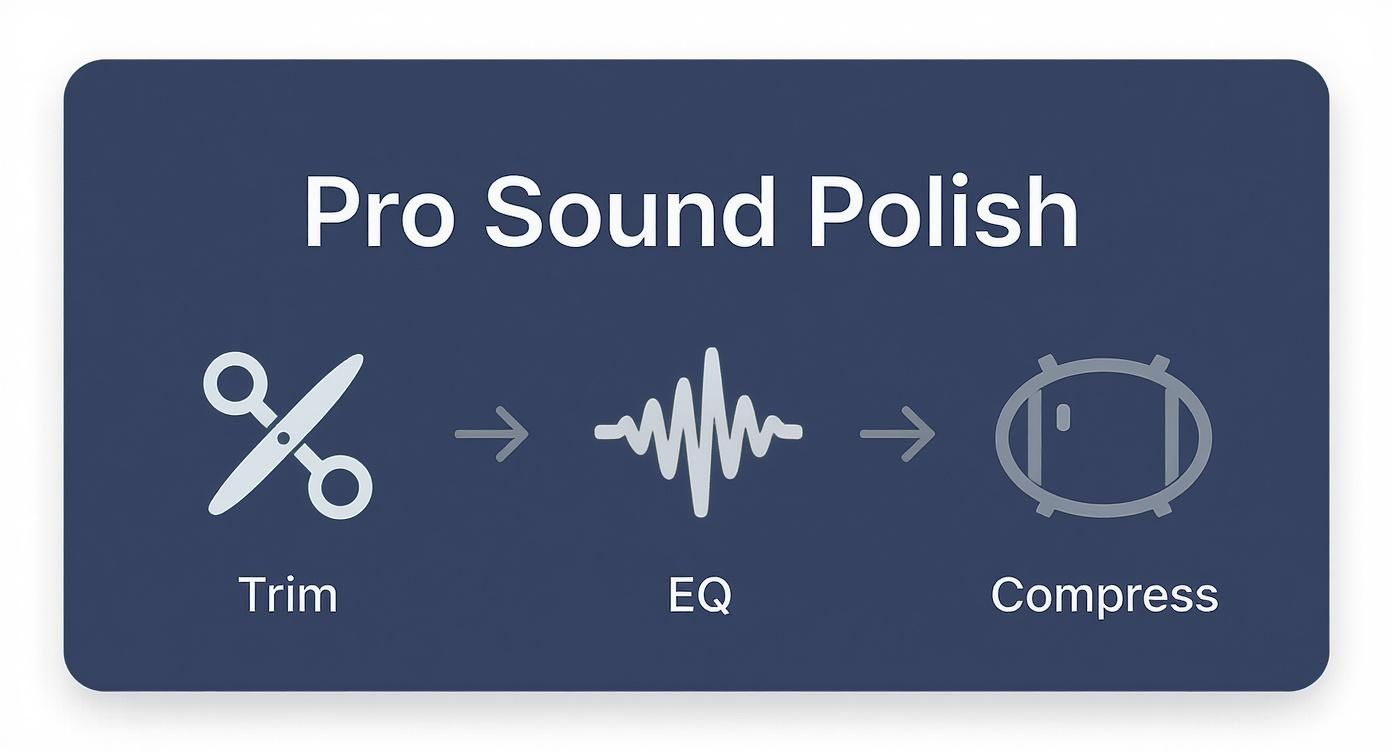
I always follow this simple but powerful workflow: tighten up the timing (trim), carve out any muddy frequencies (EQ), and even out the dynamics (compress). This sequence turns a raw generation into a polished, ready-to-use asset.
One of the most common mistakes I see is improper loudness. A notification that's too quiet is useless, but one that’s ear-splittingly loud is just obnoxious. You're aiming for that perfect balance: audible in a noisy coffee shop without making someone jump out of their skin.
A great target to shoot for is around -16 LUFS (Loudness Units Full Scale). This industry-standard level ensures your sound sits comfortably alongside other system audio, providing a consistent and professional user experience.
A great phone sound effect should inform, not alarm. Proper loudness management ensures your audio respects the user's personal space and delivers its message clearly and consistently every time.
Here's a quick cheat sheet for export settings based on where your sound will be used.
This table provides a handy at-a-glance reference for the most common export settings you'll need, whether you're building an app or producing a video.
| Parameter | iOS (e.g., App UI) | Android (e.g., Notification) | General Media (e.g., Video) |
|---|---|---|---|
| Format | .caf (Core Audio Format) | .ogg (Ogg Vorbis) | .wav or .mp3 |
| Sample Rate | 44.1 kHz | 44.1 kHz | 48 kHz |
| Bit Depth | 16-bit | 16-bit | 16-bit or 24-bit |
| Channels | Mono | Mono | Mono or Stereo (as needed) |
| Target Loudness | -16 LUFS | -16 LUFS | -14 to -16 LUFS |
Following these guidelines ensures your audio is technically sound and ready for real-world playback.
And remember, the hardware itself is getting better all the time. The cell phone loudspeakers market is set to hit USD 1.42 billion, thanks to the growing demand for higher-quality audio in everything we do. With features like stereo speakers and Dolby Atmos becoming more common, as detailed in these trends in mobile speaker technology, getting the details right from the start means your work will sound great on any device.
https://www.youtube.com/embed/FVHwtQFcJks
You've done it. You designed the perfect sound, polished it in your DAW, and it’s ready for the world. But before you drop it into a client’s mobile app or your new game, there’s a huge question you have to answer: do you actually have the legal right to use it?
This is where the often-overlooked world of audio licensing comes in, and ignoring it can get you—or your clients—into some serious legal and financial hot water. Every single audio file, whether it came from an AI generator or a massive sound library, is governed by a license that spells out exactly what you can and can't do with it.
A big tripwire for a lot of creators is the term “royalty-free.” Many people hear that and think it means “completely free for anything,” but that's a dangerous misunderstanding. It just means you don’t have to pay ongoing royalties every time the sound is used. There are still rules.
When you're sourcing any sound effect for phone projects, you need to put on your detective hat for a minute. Don’t just skim the terms of service. Read them, and pay close attention to anything that mentions commercial use. If you're using a platform like SFX Engine, this part is simple, since everything you generate comes with a commercial license baked in.
Here’s a quick mental checklist to run through before using any sound:
Getting the licensing right is non-negotiable for professional work. It's what separates the hobbyists from the reliable pros who protect their clients from risk.
For a deeper look into all this, it’s worth getting familiar with the specifics of how royalty-free music and sound effects work.
At the end of the day, it’s all about peace of mind. Taking five minutes to confirm you have the proper rights means your creative work is built on a solid legal foundation. It allows you to hand over your final assets with total confidence.
Once you start designing sounds for phones, you quickly run into a few practical questions. These are the little details that can make a huge difference in how your audio actually performs in a real-world app or device. Let's walk through some of the most common ones I hear.
One of the first hurdles is always file formats. It might seem technical, but your choice directly affects compatibility and performance, which is a big deal in app development.
Then there's the classic challenge: how do you make a notification that cuts through the noise of a busy street but doesn't jolt someone out of their chair in a quiet office? It all comes down to a bit of psychoacoustics and knowing the limits of tiny phone speakers.
For iPhones, you'll want to use .m4r. This is essentially just an AAC file (.m4a) with a different extension that iOS specifically recognizes as a ringtone. It’s the sweet spot between great audio quality and a manageable file size.
Android gives you more options. While .mp3 and .ogg both work just fine, most developers I know prefer OGG for in-app sounds. Why? It tends to offer better quality for its file size, which helps keep the overall app lighter and faster.
As a rule of thumb, I always aim to keep any notification or ringtone well under 500KB. This guarantees it will load and play instantly, which is absolutely critical for a snappy user experience. No one wants to wait for a sound effect.
The real magic here isn't about being loud—it's all about frequency and length. You're aiming for a sound that's easy to hear but just as easy to ignore once it has done its job.
First, keep it short. Seriously short. I'm talking under one second, ideally. The sound needs a sharp, clear start (what we call the transient) and then it needs to get out of the way with a quick decay. This gives it a clean, professional feel.
Next, pay attention to the frequencies. Those piercing, high-pitched tones above 5kHz are what our ears find irritating, so avoid them. Instead, focus on the mid-range. A simple melodic blip or a clean percussive hit somewhere in the 1kHz to 4kHz range is your best bet. It’s pleasant but has enough punch to cut through background noise without being harsh.
The short answer is usually yes, but this is where you absolutely have to read the terms and conditions. Whether you can use an AI sound commercially depends entirely on the license provided by the tool you're using.
Thankfully, most professional-grade tools like SFX Engine are designed for exactly this purpose. They give you a royalty-free, commercial license for the audio you generate. That means you can use the sounds in projects you sell or monetize without any extra fees.
Still, always double-check the licensing agreement before you drop a sound into a client's app or a commercial video. It’s a simple step that can save you and your clients from a world of legal headaches later on.
Ready to make your own unique, commercially-licensed sounds in just a few seconds? With SFX Engine, you can generate the perfect sound for any phone application—from UI clicks to custom ringtones—all from simple text prompts. Start creating for free today at SFX Engine.
