December 12, 2025 · Kuba Rogut

Video editor sound effects are all those audio bits and pieces you add after filming—from a subtle whoosh to a massive explosion—to make your video more realistic, emotional, and impactful. They're the secret sauce that turns flat footage into something that truly pulls the viewer in.
Ever wonder why some videos feel a bit… flat, while others feel professional and polished? The difference often isn't what you see, but what you hear. Sound effects are the invisible force that can elevate good footage into a captivating story, grabbing your viewer's attention and stirring up real emotion.
Imagine watching a big-budget action movie on mute. You can follow the plot, sure, but all the tension, excitement, and magic just evaporate. It’s the same with your videos. A simple whoosh on a transition, the satisfying crinkle of a product's packaging, or the faint background chatter of a café can completely change the feel of a scene. These little audio details are what make your video's world feel real.
At the end of the day, sound design is a powerful storytelling tool. It’s not about just dropping in random noises; it’s about carefully choosing sounds that serve the narrative you’re building. When done right, sound effects can:
Sound design is the art of telling a story with audio. Every effect, from a footstep to a futuristic laser blast, is a brushstroke that paints a richer, more engaging picture for the audience. It’s the difference between watching a scene and truly experiencing it.
Thinking this way turns sound design from a technical chore into a fun, creative process. When you know how to pick and place the right sounds, you can add incredible depth, rhythm, and emotional weight to any project. This is especially crucial for commercial work, like when you're creating compelling product videos.
Getting good with video editor sound effects means you’re not just cutting clips together—you’re crafting a complete experience. In the next few sections, we’ll dive into the essential types of effects and give you the practical know-how to make your next project sound amazing.
The world of video editor sound effects is absolutely massive, but you don't need to be a seasoned sound designer to make a huge impact. Honestly, just getting a handle on a few core categories will put you light-years ahead. It's about learning to think with your ears and choosing audio that serves a specific purpose in your story.
Think of it like a painter's palette. You start with the primary colors—your reds, yellows, and blues—and from there, you can mix just about any shade imaginable. Sound effects are the same deal. Once you master the fundamentals, you can start combining them to build any mood or atmosphere you can dream up.
First up is Foley, which is all about the sounds of human interaction with the world. Named after the legendary sound artist Jack Foley, these are the subtle, everyday noises that anchor a scene in reality. They're the sounds of life itself.
When a character walks across a gravel path, that satisfying crunch under their boots is Foley. So is the rustle of their jacket, the clink of a coffee mug on a saucer, or the soft squeak of a leather chair. Without these tiny details, scenes feel sterile and weirdly quiet, even if there's dialogue and music playing.
A great example? Imagine a tense crime thriller. The deliberate sound of a detective slowly pulling on leather gloves before examining a clue adds a whole new layer of focused tension. It’s a small detail, but it makes the moment feel real and tangible for the audience.
While Foley focuses on specific actions, ambient sounds (or ambience) are all about the big picture. They establish the environment, telling us where and when a scene is happening, often without us even consciously noticing.
Picture a scene in a busy city park. The ambient track would be a mix of distant traffic, kids laughing, the low hum of conversation, and maybe a few birds chirping. Now, swap that out for the sound of crickets and a gentle breeze rustling leaves. Instantly, we're in a quiet, rural setting at night. Ambience is your fastest ticket to transporting an audience.
An effective soundscape is really a conversation between different audio elements. Ambience sets the stage, Foley populates it with realistic actions, and other effects provide the dramatic punctuation.
Think of these background tracks as the sonic canvas you paint on. Getting the ambience right is the first and most critical step in making a scene feel authentic.
The following diagram really breaks down how these different sound effects work together to pull viewers in, guide their focus, and stir up emotions.
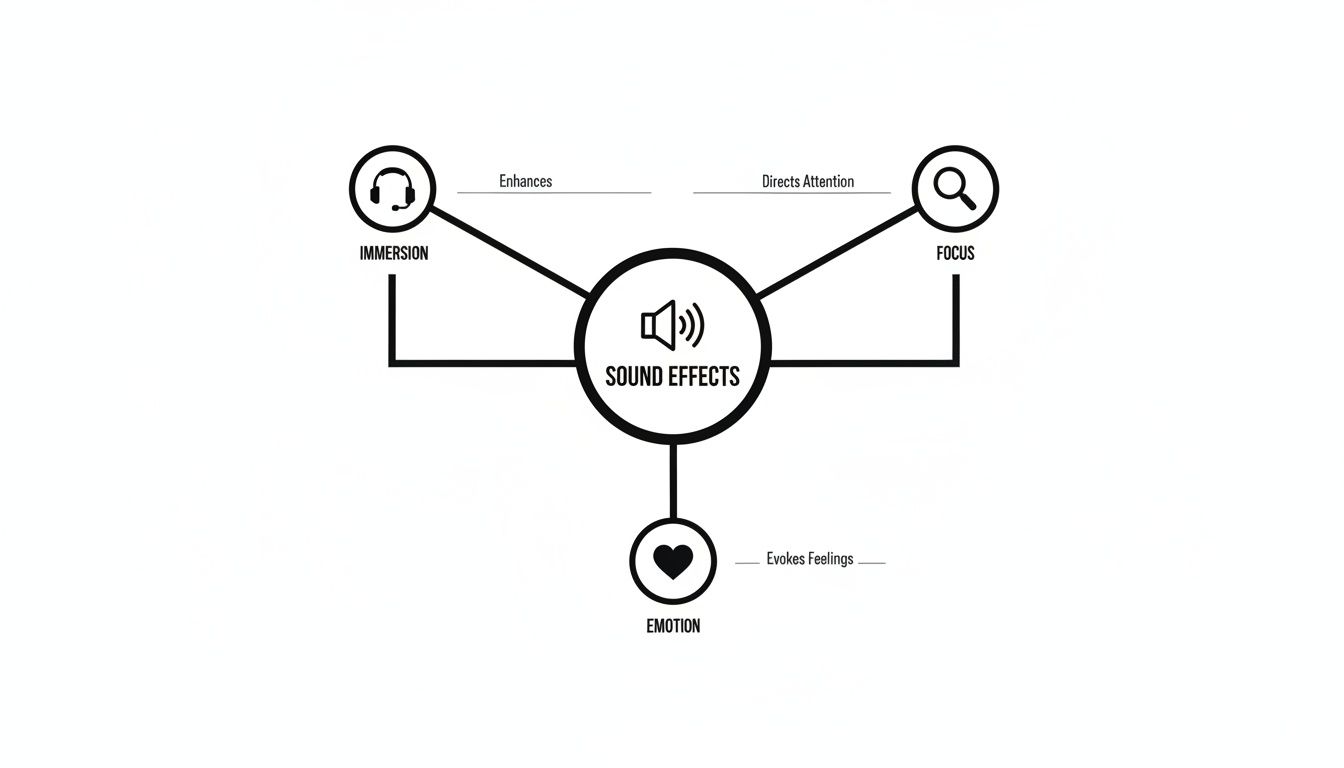
This shows that sound isn't just an afterthought; it's a fundamental part of the viewing experience that directly shapes how an audience connects with what's on screen.
Finally, let's talk about the sounds that add energy and punctuation. These are often more stylized and have become a signature of modern video editing, especially for content made for the web.
Here’s a look at the most common types of sound effects you’ll work with, what they do, and where they fit into a video edit.
| SFX Category | Description | Common Examples | Primary Use in Video |
|---|---|---|---|
| Foley | Character-driven sounds synchronized to on-screen actions to add realism. | Footsteps, cloth rustling, door closing, keyboard typing. | Grounding the scene in reality and making character actions feel tangible. |
| Ambience | Background environmental sounds that establish a sense of place and time. | City traffic, forest birds, office chatter, ocean waves. | Transporting the audience to a specific location and setting the overall mood. |
| Transitions | Stylized sounds used to smooth over cuts between shots or scenes. | Whooshes, risers, sweeps, slides. | Adding energy, creating seamless flow, and building anticipation for what's next. |
| Impacts | Sharp, punchy sounds designed to give weight to on-screen visuals or events. | Thuds, hits, stomps, glitches, cinematic booms. | Emphasizing key moments, making titles or graphics hit harder, and adding drama. |
This table covers the core building blocks you'll be using constantly. While there are countless other niche sound effects, mastering these four categories will give you a solid foundation for crafting a professional soundscape.
These effects are less about pure realism and more about creating a specific style and controlling the pace of your edit. A well-placed whoosh or a hard-hitting impact keeps the video moving and makes your key moments land with authority. By getting comfortable with Foley, ambience, and these more dynamic sounds, you'll have everything you need to start building a truly compelling audio experience for any project.
Knowing you need a specific sound is the easy part. Actually finding it? That's a whole different ball game. The right sound can absolutely make or break a scene, so every editor needs to get good at building a reliable toolkit for sourcing high-quality audio. Your options really boil down to two main paths: finding a pre-existing sound or creating something brand new from scratch.
The search for the perfect video editor sound effects isn't about one method being better than the other. It's about knowing when to use which. Let's dig into the most effective ways to find—or create—the audio that will make your video projects sing.
For years, the undisputed king has been the stock sound library. These are massive, searchable databases packed with professionally recorded and organized sound effects. Think of them as the audio equivalent of a stock photo site, where you can find everything from a subtle door creak to a city-leveling explosion.
These libraries are invaluable. The sounds are usually captured by pros with top-tier equipment, which means you're getting clean, ready-to-use audio. The trade-off, of course, is that this convenience often costs money, either through a monthly subscription or a pay-per-sound license.
While you can find free options, the paid libraries typically offer better organization, higher fidelity audio, and—most importantly—crystal-clear licensing for commercial work. This is part of a larger trend of creators investing in professional assets. The U.S. Video Postproduction Services market, for instance, was estimated to hit $6.8 billion in 2025, and you can see more on these video industry market trends.
A deep sound library is an editor's best friend. But the real skill isn't just having access to thousands of sounds; it's knowing how to quickly find the one that tells the right story in that precise moment.
If you're just starting out and building your kit, exploring some of the free sound effects for film is a great way to get your hands on quality assets without the upfront investment.
But what happens when the sound you need simply doesn't exist in a library? Maybe your script calls for the sound of a "tiny, rusty robot sneezing sparks" or "a magical potion that bubbles with faint whispers." This is where AI sound generation completely changes the game.
Tools like SFX Engine let you create entirely new, bespoke sound effects just by describing them with words. Instead of spending hours hunting for something "close enough," you can generate the exact sound you hear in your head in a matter of seconds. It's a massive leap forward in creative control.
And it’s not just for sci-fi or fantasy. This technology is incredibly handy for crafting subtle, specific ambiences or unique Foley that has to sync perfectly with the action on screen.
Getting great results from an AI sound generator all comes down to the quality of your prompt. Think of it as giving directions to a sound designer—the more specific and descriptive you are, the better the final product will be.
Here’s a simple framework for writing effective prompts:
Let's see how this works with a few examples.
AI Prompt Examples:
Weak Prompt: Sword sound
Strong Prompt: A heavy, steel broadsword being unsheathed slowly from a leather scabbard, metallic scrape and ringing echo
Weak Prompt: Computer noise
Strong Prompt: Futuristic computer terminal booting up, with soft chimes, digital data streams, and a gentle, low humming fan in a quiet room
Weak Prompt: Footsteps
Strong Prompt: Single person walking quickly on a wet gravel path at night, heavy leather boots crunching, distant crickets chirping
By getting comfortable with both traditional libraries and AI generation, you build a versatile audio toolkit that prepares you for any creative challenge. You'll be ready to go whether the job calls for a classic library effect or something completely new that no one has ever heard before.
Not all audio files are made equal. This is one of the first technical hurdles every video editor has to clear, and it’s a big one. The format you choose directly impacts the quality, flexibility, and final polish of your sound design.
Think of it like the difference between a RAW photograph and a compressed JPEG. One gives you every ounce of original detail to manipulate, while the other sacrifices quality for a smaller, more manageable file. When you're working with sound effects for video editing, you always want to start with the best source material you can get your hands on. It prevents a ton of headaches later.
This constant tug-of-war between quality and convenience is the core of understanding audio formats. For professional work, one side almost always wins.
Audio files really fall into two main camps: uncompressed and compressed. For editing, uncompressed formats are the gold standard because they contain 100% of the original audio information exactly as it was recorded.
Compressed formats, as the name suggests, use clever algorithms to shrink the file size. They do this by throwing away audio data our ears are less likely to miss.
When you're editing video, always try to source and work with uncompressed formats like WAV. You can always compress a high-quality file when you export the final video, but you can never add back the quality that was stripped from a compressed file.
Trying to edit compressed audio is like trying to color-grade a low-resolution image—you’ll start seeing ugly artifacts and a general lack of clarity the moment you try to make any real adjustments. If you have a great WAV file but need an MP3 for a web preview or something similar, you can learn how to change a WAV to an MP3 the right way, without messing up your original files.
Okay, beyond the file type, two other specs are crucial for the quality of your sound effects: bit depth and sample rate. You don't need a degree in audio engineering, but knowing the basics will help you choose the right assets.
Bit Depth (How Much Dynamic Range?) Imagine bit depth as the number of volume steps between total silence and the absolute loudest sound. More steps mean a wider dynamic range and a much quieter "noise floor"—that faint hiss you sometimes hear.
Sample Rate (How Much Frequency Detail?) The sample rate is just how many "snapshots" of the audio are taken every second. A higher sample rate can capture a wider range of frequencies, especially the super-high ones.
So, what's the magic formula? Simple. For all your sound effects, aim for 24-bit, 48 kHz WAV files. This combo gives you the absolute best quality and flexibility for mixing, layering, and making your audio sound incredible.
Alright, you've found the perfect sound effects. Now comes the real art: making them all work together in your timeline. Think of yourself as a sonic chef. You're not just dumping ingredients into a pot; you’re carefully balancing the distinct flavors of dialogue, music, and sound effects to create one cohesive, immersive experience.
The goal here is to build an audio landscape where every sound has its own space. Your dialogue needs to be crystal clear, the music has to set the mood without stealing the show, and your video editor sound effects must feel like they truly belong in the world you’re creating.
Before you even think about adding cool plugins, you need to get your levels right. This crucial first step is called gain staging, and it's the bedrock of a clean, professional mix. The idea is simple: make sure every audio clip is at an ideal volume—loud enough to be heard clearly, but not so loud that it starts to crackle and distort.
Imagine a room where everyone is shouting over each other. It’s just chaos. That’s exactly what happens in your audio timeline if your levels are all over the place.
As a rule of thumb, adjust the gain on each sound effect so its loudest peaks hit somewhere between -6dB and -12dB on your audio meters. This simple practice gives you plenty of "headroom," which is just breathing room for all the other audio elements you'll be layering in.
Your video has width, so why should your audio be trapped in the dead center? Panning lets you place sounds anywhere in the stereo field, from left to right. It’s a deceptively simple tool that can instantly make your video feel more spacious and real.
When a car zips across the screen from left to right, its sound should follow that path. It’s a tiny detail, but it makes a world of difference for immersion.
Good audio mixing isn't about making sounds louder; it's about giving each sound clarity and its own place to live. When done right, the mix becomes invisible, allowing the viewer to become completely absorbed in the story.
The tools for this are constantly getting better. The global market for audio and video editing systems was estimated at $15.0 billion in 2025 and is expected to grow by about 12% annually through 2033, thanks in large part to smarter AI tools and cloud workflows. You can explore these industry research findings to see where the technology is headed.
Even a technically perfect sound effect can feel jarring if it doesn't match the acoustic environment of the scene. This is where two of your most powerful tools come into play: Equalization (EQ) and Reverb.
Equalization (EQ) EQ is just a fancy term for adjusting the balance between a sound's frequencies—the bass, mids, and treble. For instance, a footstep outdoors won't have the same deep, bassy reflections as one in a tiny bathroom. You can use a high-pass filter in your EQ to gently trim the low-end frequencies from an outdoor sound, making it instantly feel more natural.
Reverb Reverb mimics the way sound bounces around a space. A clap in a huge cathedral will echo for seconds, while a clap in a cluttered, carpeted bedroom will be short and dry. The secret trick here is to add a touch of the same reverb to both your dialogue and the sound effects in a given scene. This is the quickest way to "glue" everything together, convincing the viewer that all the sounds are happening in the same physical location.
Another essential tool for polishing your mix is compression, which helps control and even out volume levels. For a deeper dive, our guide on what is audio compression breaks down how it can add that final professional touch.
The world of sound design is changing fast, and it’s pulling video editing right along with it. We're moving away from the old, time-consuming workflows and into a smarter, more immersive future. For editors, keeping up isn't just about learning new software—it's about grasping entirely new creative possibilities. The next wave of audio tech is all about saving you time on the boring stuff so you can build richer, more captivating soundscapes.
If you know where the industry is headed, you can keep your skills sharp and make sure your work stands out. Three big shifts are driving this evolution: the rise of artificial intelligence, the demand for immersive audio, and the surprising power of mobile editing.
Artificial intelligence is already making a huge mark on post-production. Smart tools are starting to automate the most tedious parts of sound design, which frees up editors to actually focus on the creative side of things.
Take AI-powered features like automated dialogue cleanup or intelligent noise reduction. These tools can pull a clean voice track out of a noisy background with incredible accuracy, saving you hours of painstaking manual work. It also means that using effective video annotation tools is becoming more integrated into the review cycle for both sound designers and video editors, helping teams collaborate more efficiently.
The future of audio post-production isn't about replacing the editor. It's about giving them intelligent assistants to handle the technical heavy lifting. This opens up more room for creative experiments and much faster turnarounds.
This shift means you can get pristine audio quality quicker than ever, even if the original recordings were far from perfect.
Audiences today want to feel like they're part of the story, and audio is a huge part of that. Spatial audio, which creates a three-dimensional sound experience, isn't just for big-budget cinemas anymore. It's quickly becoming a standard for premium content, virtual reality (VR), and even major streaming services.
This technology lets you place video editor sound effects anywhere in a 360-degree space around the listener, making them feel like they're right there in the scene. A helicopter doesn't just pan from left to right; it soars directly overhead. It creates a feeling of realism and immersion that traditional stereo just can't touch.
Finally, professional-grade sound design is no longer chained to a desktop computer. As phones and tablets get more powerful, sophisticated editing apps are making it possible to produce high-quality audio from practically anywhere. In fact, industry reports show that roughly 70% of editors now use mobile devices for at least some of their work.
This trend is pushing the demand for lightweight, optimized sound effects—things like whooshes and impacts designed for fast turnarounds on a mobile timeline. These evolving editor needs, along with the growth of AI and immersive audio, are completely reshaping how we use sound. Keeping an eye on these changes will ensure you’re ready for the next generation of audio storytelling.
Diving into the world of sound design can feel a bit overwhelming. You've got the visuals down, but the audio is a whole other beast. Let's tackle some of the most common questions video editors ask about sound effects.
You can find some surprisingly great stuff for free. Sites like Pixabay, ZapSplat, and FreeSound are packed with royalty-free sound effects. They’re fantastic places to start, especially when you're on a tight budget.
Just a heads-up: while free is great, paid libraries often deliver more consistent quality and better file organization. Always, always double-check the license agreement on free sounds to make sure you're clear for commercial use.
Getting a sound to feel like it belongs in a scene comes down to two things: volume and reverb. Think of it like this: a distant explosion should sound much quieter than one right next to the camera. Start by adjusting the volume (or gain) to match how close the sound source is supposed to be.
Next, add a touch of reverb to match the room's acoustics. A whoosh in a huge, empty cathedral will echo way more than one in a tiny, cluttered closet. This little bit of reverb is the "glue" that sticks your sound effect to the environment, making it feel completely natural.
Blending a sound effect is less about the effect itself and more about how it interacts with the sonic environment you've built. Matching volume and reverb convinces the listener's brain that the sound truly belongs there.
This is a great question. Foley is a special kind of sound effect that's custom-made by a Foley artist. They watch the picture and perform sounds in sync with the action—think footsteps on gravel, the rustle of a jacket, or a character picking up a glass. It’s all about capturing the subtle, human-made sounds.
"Regular" sound effects, often called "hard effects," are typically pre-recorded sounds from a library. These are things like explosions, gunshots, car engines, or sci-fi whooshes that you drop into your timeline.
Yes, and it’s a game-changer. Modern AI sound generators can create incredibly specific, high-quality audio from just a text description. Need the sound of "a magical crystalline chime in an ethereal cave"? An AI can generate that for you in seconds.
This is a huge advantage when you need a unique sound that you just can't find in a standard library. It gives editors a ton of creative power to craft the perfect audio for any moment, making it an awesome tool to have in your back pocket.
Ready to create the exact sound you need without searching through endless libraries? With SFX Engine, you can generate custom, high-quality, royalty-free sound effects from a simple text prompt. Try it for free and hear the difference at https://sfxengine.com.
