Your Guide to Royalty Free Sound Effects for Creators
Discover how royalty free sound effects can elevate your projects. This guide covers licensing, sourcing, and using SFX to create professional-level content.
Kuba RogutPublished 16 min read
Let's get one thing straight: "royalty-free" doesn't mean "free." Think of it as a one-and-done deal. You pay a single, upfront fee for a sound effect, and it's yours to use in your projects forever.
That's it. No recurring payments or royalties are ever due to the original creator, no matter if your video gets ten views or ten million. It’s a beautifully simple and budget-friendly way to get professional-grade audio into your work.
What Are Royalty-Free Sound Effects, Really?
Imagine you’re a carpenter. You go to the hardware store and buy a high-quality hammer. You pay for it once, and then you're free to use that hammer to build as many things as you want—a chair, a deck, a whole house—without ever paying the hardware store again.
That's exactly how royalty-free sound effects work. The one-time fee gives you a license—the right—to use that sound in as many projects as you like.
This model is a lifesaver for creators. It completely sidesteps the headache of traditional licensing, where you could be on the hook for payments based on where your content is shown, how many people see it, or how much money it makes. For anyone making content for YouTube, podcasts, video games, or ads, this means you get cost certainty and, just as importantly, legal peace of mind.
The Exploding Need for Good, Clean Audio
The demand for high-quality, legally-sound audio has absolutely skyrocketed. The market for royalty-free music and sound effects has ballooned into an estimated $2 billion industry. Why? Because of the relentless churn of content on platforms like YouTube, TikTok, and countless podcasts.
This isn't just some abstract number; it points to a massive shift in how we create. Modern creators, from solo vloggers to small marketing teams, need access to professional tools without a Hollywood budget. Royalty-free assets are the great equalizer, allowing anyone to achieve the same audio polish as a major studio.
Royalty-Free Isn't the Only Game in Town
It's super important to understand the lingo here, because getting it wrong can land you in hot water. Royalty-free is often confused with terms like "free" or "copyright-free," but they are worlds apart.
The term 'royalty-free' is all about the license, not the price. It means you're free from royalties (ongoing payments), not free from the initial cost. Getting this right is your first line of defense against accidental copyright infringement.
So, how does it stack up against other models? Let's break it down.
Audio Licensing Models at a Glance
Navigating audio licenses can feel a bit like alphabet soup at first. Each model has its own rules, costs, and best-use cases. The table below gives you a quick snapshot of the most common types you'll run into.
| License Type | Payment Structure | Usage Rights | Best For |
|---|---|---|---|
| Royalty-Free | One-time fee | Perpetual, unlimited projects | Most digital creators: YouTubers, podcasters, indie developers. |
| Rights-Managed | Per-use, time, or territory | Highly specific and restricted | Big-budget commercial ads, broadcast TV, feature films. |
| Public Domain | Free (no cost) | Unrestricted use | When budget is zero and you can find a suitable (often older) recording. |
| Creative Commons | Free (no cost) | Varies by license; attribution often required | Hobbyists, non-commercial projects, or when you can meet attribution rules. |
As you can see, for the vast majority of online creators, the royalty-free model hits that perfect sweet spot of quality, flexibility, and affordability. It delivers the professional sound you need without the legal complexity or prohibitive cost of other options.
Getting to Grips with SFX Licensing Fine Print
So, you've found a "royalty-free" sound. Great start, but the work isn't done yet. Think of it like buying a ticket to a theme park—it gets you in the gate, but some rides might require a special pass. Not all royalty-free licenses are created equal, and knowing the difference is what keeps you out of legal hot water.
You absolutely have to dig into the license agreement. That document is your rulebook. It spells out exactly what you can and can't do with the sound effect. Skipping it is like signing a contract blind; you're agreeing to all the terms and potential penalties, whether you've read them or not.
Standard vs. Extended Licenses
Most sound libraries offer a standard license that's perfect for the vast majority of digital projects. This usually covers things like YouTube videos (even monetized ones), podcasts, social media content, and indie games. It's the go-to license for the everyday creator.
But what if your project is bigger? That's where an extended license comes in. It grants you much broader rights for projects with a massive audience.
You'll need an extended license for things like:
- Broadcast Television: Commercials or shows airing nationally.
- Theatrical Films: Movies hitting the big screen.
- Major Paid Ad Campaigns: Big-budget digital advertising.
- Mass-Market Products: Using a sound in a toy that will be sold in thousands of stores.
Sure, an extended license costs more, but it’s essential protection for these high-stakes commercial uses. Using a sound with a standard license in a Super Bowl ad is a surefire way to get a very unpleasant call from a lawyer.
Cracking the Code on Legal Terms
License agreements can feel like they're written in another language, but once you know a few key terms, it all starts to make sense. Getting comfortable with this jargon is crucial for making the right choice.
A license is more than just permission; it's a specific set of boundaries for your creativity. Understanding terms like 'perpetuity' or 'non-exclusive' ensures you're building your project on solid legal ground, protecting both your work and your wallet from future complications.
Here are the big ones you'll see again and again:
- Non-Exclusive: This just means you aren't the only person who gets to use the sound. Thousands of other creators can license that same whoosh or explosion. This is the norm for almost all royalty-free libraries.
- Worldwide: Your license is valid anywhere on the planet. For anything you post online, this is non-negotiable.
- In Perpetuity: This is a big one. It means your right to use the sound in that specific project never expires. Make a video today, and the license for its sound effects is good forever.
This flowchart can help you figure out where to start when looking at a license for your project.
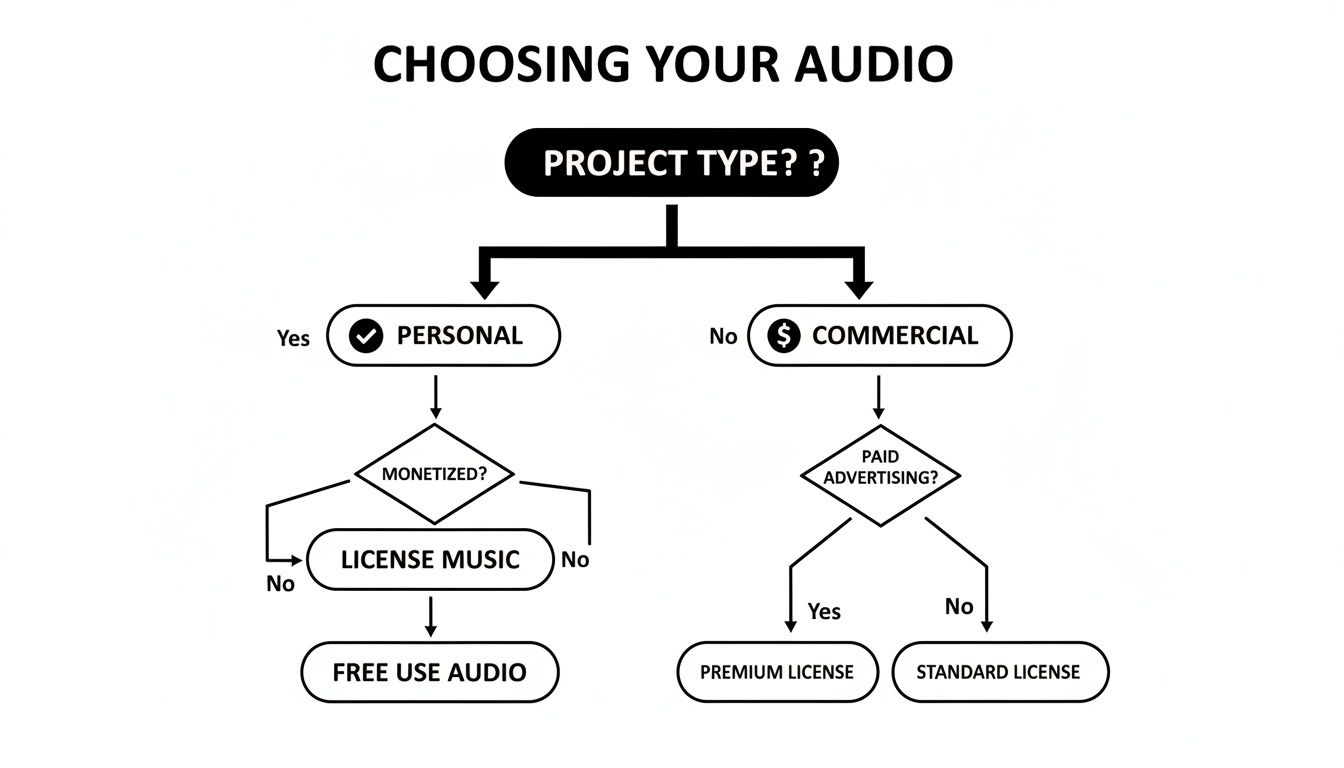
The main takeaway here is simple: your intended use—whether it's a personal vlog or a commercial product—is the first and most important thing to consider.
Knowing the full picture of royalty free music and sound effects is a core skill for any modern creator, letting you source all your audio with confidence.
Real-World Licensing Scenarios
Let's make this practical. Imagine you're a freelance video editor making a promo video for a local pizza shop's Instagram page. A standard royalty-free license is exactly what you need. The project is commercial, but the scale is small and fits perfectly within the standard use case.
Now, picture an indie game developer who's about to launch their game on Steam. They also need a commercial license. But because the sound is being baked into a product that will be sold over and over, they need to double-check that the license allows for that kind of distribution. Most do, but it's a critical detail you can't afford to miss.
How Royalty-Free SFX Give You a Creative Edge
Using royalty-free sound effects is about so much more than just saving a bit of cash. It's a strategic decision that hands you a real creative advantage. Think of it as leveling the playing field, giving smaller creators the tools to compete with the polish and professionalism of big-name studios.
This easy access to top-notch audio lets you build richer, more believable worlds for your audience. A perfectly placed sound effect can completely transform a scene, injecting a sense of weight, emotion, or realism that visuals just can't deliver on their own. It’s that invisible layer that makes your creative vision finally feel whole.
Accelerate Your Creative Workflow
Picture this: you're a solo podcaster trying to churn out a weekly show. Instead of losing hours trying to record a clean intro sting or the perfect whoosh transition, you can grab a studio-quality asset from a library in a matter of seconds. This isn't just a minor convenience; it's a massive boost to your workflow.
That speed lets you pour your energy where it really counts—into your storytelling, editing, and nailing the core content. For video creators and game developers, the time savings are even more dramatic. Building a soundscape from the ground up is a monumental job, but a solid royalty-free library can turn days of work into just a few minutes.
A vast SFX library is like having a dedicated Foley artist on call 24/7. It removes technical barriers, enabling you to experiment and iterate on your sound design quickly, leading to a more refined and impactful final product.
This kind of efficiency is a total game-changer, especially when you're up against a tight deadline.
Compete with Larger Studios
That high-end production value once reserved for big-budget projects? It’s now within reach for pretty much everyone. A solo indie game developer can make their world feel just as immersive as one built by a team of hundreds, all by using detailed ambient sounds, crisp UI clicks, and punchy explosion effects.
This democratization of quality sound is a direct result of the booming market for royalty-free assets. In fact, it's estimated that over 60% of all audio used in modern productions is royalty-free. This shift shows just how vital these resources have become for creators of all sizes. For a closer look at the market trends shaping modern media, you can explore the full stock music market analysis on technavio.com.
By tapping into these libraries, you can deliver an experience that feels premium and professional, no matter the size of your team or your budget.
Deepen Audience Engagement
Sound is an incredibly powerful tool for creating an emotional connection. The right sound effect can make an audience feel tension, joy, or surprise on a gut level, often without them even realizing it.
Here’s how that plays out in the real world:
- For the YouTuber: A subtle swoosh as text appears on screen makes the edit feel more dynamic and keeps viewers locked in. A well-timed comedic sound can turn a good joke into a truly memorable moment.
- For the Filmmaker: The distant rumble of thunder can foreshadow conflict, while the gentle chirping of crickets can instantly establish a scene's tranquility without a single word of dialogue.
- For the Podcaster: A crisp, professional audio logo at the start and end of your show builds brand recognition and signals quality to your listeners from the first second.
Each of these small touches adds up to a much more engaging and immersive experience. High-quality royalty-free sound effects aren't just background noise; they are active participants in your storytelling, helping you connect with your audience and leave a lasting impression.
Finding and Using the Perfect Sound Effect
Great sound design is an art, and a quality library of royalty-free sound effects is your palette. But here's the thing: having access to thousands of sounds is one thing. Knowing how to find the perfect one quickly and use it skillfully is what separates amateur content from professional productions. It's the secret to transforming your audio from simple background noise into a powerful storytelling tool.
The key to finding the right sound fast is all about specificity. Searching a library for a generic word like "noise" will just throw a massive, useless list of options at you. You have to start thinking like a sound designer.
So, instead of "hit," try searching for "dull thud on hollow wood" or "sharp metal clank on concrete." The more descriptive your keywords, the more accurate your results will be. This one simple shift in how you search can slash your time spent hunting for sounds.
Understanding Basic Audio Quality
Once you’ve got a few potential candidates, you’ll probably run into technical terms like bit rate and sample rate. Don't worry, you don't need a degree in audio engineering, but knowing the basics will help you pick the best quality file for your project.
- Sample Rate (kHz): Think of this as the audio version of frames per second in a video. It’s the number of "snapshots" of the sound wave taken each second. For most projects, 44.1 kHz (which is CD quality) or 48 kHz (the standard for video) is more than enough.
- Bit Depth (bit): This term describes the dynamic range—basically, the difference between the quietest and loudest parts of the sound. A higher bit depth means more detail. 16-bit is perfectly fine, but 24-bit is the professional standard because it gives you a lot more flexibility when you get to editing.
As a rule of thumb, choosing a file that's at least 44.1 kHz and 16-bit will ensure your sound is clean and professional. Most reputable libraries provide high-quality files by default, which is a huge help. If you're pulling sounds from different places, our guide on finding a reliable free sound effects download can point you toward quality-controlled options.
Your goal is not just to add sound, but to create a believable audio environment. The technical quality of a sound effect file is its foundation—a poor quality recording will stand out for all the wrong reasons, no matter how well it’s mixed.
Integrating Sounds Like a Professional
Finding the sound is only half the battle. How you actually use it is what makes all the difference. To blend your sound effects seamlessly, you'll need the right tools, and that often means looking into the cheapest video editing software to get a full creative suite without breaking the bank.
Once you have your software ready, try focusing on these three techniques:
- Layering for Richness: A single sound effect can often feel a bit thin or weak on its own. Layering multiple sounds is how you create real depth. For an explosion, don't just use one "boom." Layer a deep, low-frequency rumble, a sharp crack for the initial blast, and the sound of falling debris. The result is a much more impactful and realistic moment.
- Mixing Volume Levels: Your sound effects should support your content, not drown it out. In most projects, the dialogue is king. You’ll want to mix your SFX to sit comfortably underneath the spoken word, only cranking the volume for those key, impactful moments.
- Using Effects for Placement: A "dry" sound effect, one with no processing, can feel disconnected from the scene. Adding just a touch of reverb or echo can make it feel like it truly belongs in that physical space. A footstep in a huge cavern needs a long, trailing echo, while a footstep in a small, carpeted room needs almost none. This simple trick contextualizes the sound and sells the illusion to your audience.
Creating Custom Audio With AI Sound Generators
Even with massive royalty-free sound libraries at our fingertips, sometimes you just can't find the sound. What happens when your project calls for the sound of a "tiny alien spaceship sputtering to a halt on a mossy log"? Good luck finding that in a standard library.
This is where the next evolution in sound design is taking shape. AI sound generators are completely flipping the script on how we source audio. Instead of searching for a sound, you can now simply describe the sound you want and create it from scratch.
Turning Words into Sound Waves
The concept is surprisingly simple and works a lot like the AI image generators you've probably seen. You just type a detailed description of the sound you're imagining, and an AI model translates your words into a brand-new audio file.
Think of it as having a personal Foley artist on call, ready to invent any sound you can dream up. This gives you an incredible amount of creative control, finally solving that age-old problem of hunting for one perfect sound that just doesn't seem to exist.
The real magic of AI sound generation is specificity. You no longer have to settle for a generic 'door creak' when your scene really needs the 'slow, heavy groan of an ancient oak door opening into a dusty tomb.'
This technology closes the gap between your creative vision and the final audio mix. It opens the door to a level of customization that, until recently, was only possible with a fully equipped recording studio.
How to Craft an Effective Prompt
The quality of the sound you get is a direct reflection of the quality of your prompt. If you're vague, you'll get a generic result. To get something truly special, you need to act like a director and give the AI clear, descriptive instructions.
Here’s a simple framework for building a better prompt:
- Start with the subject: What is making the sound? A "robot," a "dragon," a "stream."
- Add an action verb: What is the subject doing? "Powering down," "breathing fire," "babbling."
- Layer on descriptive adjectives: What does it sound like? Is it a "low hum," "fierce," or "gentle"?
- Provide context: Where is this sound happening? "In a metal cavern" or "deep in a forest."
Typing "explosion" will get you a generic boom. But a prompt like, "A distant, muffled explosion followed by the faint sound of glass shattering on pavement" gives the AI so much more to work with, producing a far more convincing and layered effect.
This process allows you to generate completely custom, royalty-free sound effects that are a perfect match for your project. To see just how powerful this can be, you can learn more about how an AI sound effect generator works and start bringing your own unique audio ideas to life.
Got Questions About Royalty-Free SFX? Let's Clear Things Up.
Diving into the world of royalty-free sound effects can feel a bit like navigating a new city—mostly straightforward, but a few confusing signs can leave you scratching your head. It’s normal to have questions, and getting them answered is the key to using SFX with total confidence.
Think of this as your personal cheat sheet. We'll tackle the most common questions creators ask, so you can stop worrying about the legal stuff and get back to creating.
Can I Use These Sounds In My Commercial Projects?
In almost every case, the answer is a resounding yes. That’s the whole point, really. The vast majority of royalty-free licenses are built with commercial use in mind, whether you're monetizing a YouTube channel, running podcast ads, or selling an indie video game.
The one golden rule? Always glance at the license terms from the library you're using. While premium platforms are pretty much guaranteed to cover commercial rights, some free SFX might be limited to personal projects only. A quick 30-second read of the license is all it takes to make sure you're in the clear.
The real beauty of a royalty-free license is that it empowers creators to build a business from their work. Just assume commercial use is okay, but always verify—it's a simple step that saves a lot of headaches later.
What's The Difference Between "Royalty-Free" and "Copyright-Free"?
This is a big one, and it trips up a lot of people. These two terms sound similar, but they mean completely different things legally. Getting this right is fundamental to using stock audio safely.
- Royalty-Free: You’re buying a license to use a copyrighted sound without having to pay ongoing fees (royalties) for each use. The original creator still owns the copyright; they've just given you a pass to use it according to their terms.
- Copyright-Free: This is a much broader category, usually referring to works in the Public Domain. For these sounds, the copyright has expired, been given up, or never existed in the first place. You can use them however you want, for any reason, no permission needed.
Honestly, genuinely copyright-free audio is pretty rare. The high-quality, professionally produced sound effects you’ll want for your projects are almost always going to be royalty-free.
Do I Have To Give Credit To The Sound Effect's Creator?
It really just depends on where you got the sound. There isn't a universal rule here, so you have to check the license agreement for each specific SFX you download.
Generally, paid platforms and professional libraries don't require you to give any credit, which keeps your project credits clean and simple. On the flip side, many free sound effect sites, especially those using a Creative Commons license, make attribution a legal requirement. If you don't credit the artist exactly as they ask, you're technically breaking the terms of the license. So, always check the rules before you hit publish.
Can I Edit Or Modify Royalty-Free Sound Effects?
Absolutely! In fact, you're encouraged to. Most licenses are written with the expectation that you'll tweak the sounds to fit perfectly into your project. That means you're free to do things like trim the length, loop a section, adjust the pitch, or add effects like reverb and echo.
The only major no-no is taking that edited sound and trying to sell it as your own new sound effect. Your license gives you the right to use the audio inside your creative work (like a film, game, or podcast), not to turn around and redistribute the asset itself.
Ready to stop searching and start creating? SFX Engine offers an AI-powered sound generator that lets you craft the perfect custom, royalty-free audio from a simple text description. Generate exactly what you need, right when you need it. Try SFX Engine for free.