December 9, 2025 · Kuba Rogut
A good sound effects click is so much more than just a bit of audio feedback. It's the digital equivalent of a satisfying handshake—a tiny moment that confirms an action, builds user confidence, and helps shape the personality of a brand.
Think about the crisp tap of a button in your favorite mobile app or the chunky clack of a menu in a video game. These small sounds have a massive impact on how we feel when we interact with technology.
When an app feels truly polished and intuitive, you can bet its sound design is playing a quiet but crucial role. A well-made click gives you instant confirmation that your touch registered, which cuts down on uncertainty and just makes the whole experience feel smoother. This is the core job of sound in a user interface: to communicate without needing a single word.
But it goes deeper than just function. A click sound effect is a huge part of an application's vibe and identity. A soft, rounded click might suggest a friendly, easygoing brand, whereas a sharp, metallic one can feel more precise and professional. It's a subtle but powerful form of sonic branding that helps create a cohesive experience users remember.
In interactive media like video games, the right click is a cornerstone of immersion. That satisfying thump when you slot a new magazine into a weapon or the gentle tick as you scroll through an inventory menu—these sounds provide feedback that connects you directly to the game world.
They aren't just for show; they make your actions feel real and rewarding. This kind of attention to audio detail is what separates good design from great design.
The industry is taking notice, too. The global sound effects services market was valued at around USD 2.5 billion in 2025 and is on track to hit an estimated USD 4.2 billion by 2033. You can learn more about the growth of the sound effects market from industry reports. This boom shows just how much demand there is for high-quality, custom audio across the board.
A click is the simplest form of a conversation between a user and a device. A good click says, "I heard you." A great one adds, "...and it felt good."
Ultimately, learning how to create a great sound effects click is a fundamental skill for any designer. It forces you to think about sound as a core part of the design process, not just something you tack on at the end. It's a small detail that can lift a project from just being functional to feeling truly exceptional.
Alright, this is where the fun starts. Creating a truly compelling sound effects click with a tool like SFX Engine is less about random chance and more about giving the AI a clear vision. You have to think like a sound designer and translate the vibe you're after into words the engine can actually work with.
Your prompt is everything. If you just type in "click sound," you're going to get something generic and forgettable. The magic happens when you get specific. What's making the click? What's it made of? Where is it happening?
Let's get practical. A great prompt isn't a single word; it's a small story. By layering different concepts, you can steer the AI toward a much more unique and textured sound. This is how you take real control over the final product.
I've found a few simple formulas that work wonders for different styles of clicks:
Notice how each of those prompts paints a clear picture. That's exactly what the AI needs to generate a high-quality, targeted sound effects click. The more detail you feed it, the closer you'll get to the sound in your head. If you want to dive deeper into the fundamentals, our guide on how to create sounds is a great place to start.
Pro Tip: Don't be afraid to throw in emotional or atmospheric words. Adjectives like "satisfying," "sharp," "subtle," or "hollow" really do influence the generation. They can add a layer of personality that purely technical terms just can't capture.
Let's break down a couple of common scenarios.
Imagine you're designing the sounds for a sleek, minimalist productivity app. You need something that feels efficient and clean, but not annoyingly sharp.
A weak prompt would be: UI button click.
A much better prompt is: A subtle, high-frequency tick sound effect, like a tiny glass bead tapping on a polished wooden surface, very short decay, no reverb.
Why does this work so much better? It's all in the details:
This tells the AI exactly what kind of physical event to simulate, resulting in a click that sounds intentional and sophisticated.
Now, for something completely different, let's say you're working on a fantasy RPG and need a sound for the inventory menu. You could try: "A low, resonant click of an ancient stone mechanism locking into place, dusty and heavy." This prompt instantly creates a sense of weight, history, and immersion.
The key takeaway here is to experiment. Tweaking just one or two words in your prompt can lead to some wonderfully unexpected and useful results.
Getting a sound out of an AI generator is just the beginning. The real craft, the part that separates a generic click from a truly satisfying one, happens in the refinement stage. This is where you take that raw audio and mold it into something that has character and perfectly fits your project.
The tools for this kind of work have never been better. In fact, the market for sound effects software—the very tools we use to create and polish sounds like a sound effects click—was already valued at USD 3.5 billion in 2024. It’s expected to blow past USD 7.1 billion by 2033. This massive growth, detailed in recent industry research, is all about the demand for high-quality, custom audio. Powerful new tools are making what was once complex studio work accessible to everyone.
Before you start getting fancy, you have to get the basics right. Tweaking the core parameters of your generated click is the fastest way to completely change its feel. Even small adjustments here can have a huge impact.
Think of it as dialing in the core personality of the sound.
Pitch: This is your primary tool for feel. Pitch it up, and you get a crisp, light, almost digital sound—perfect for a sleek, modern UI. Pitch it down, and it suddenly feels more physical, weighty, and mechanical.
Decay and Sustain: How long does the click linger? A super-short decay gives you a sharp, tight "tick" that feels incredibly responsive. Let it ring out just a little longer, and you get a "thump" or a "clack" with more body. For UI sounds, faster is almost always better.
Transients: The transient is that initial, powerful spike at the very start of the sound. It's the "snap." By sharpening this tiny fraction of a second, you can make a soft click feel punchy and defined without actually making it louder.
A great click sound effect isn't just heard; it's felt. The goal here is to tune the audio so that it provides that satisfying, almost tactile feedback, making a simple screen tap feel tangible.
Once you’ve got a solid foundation, it’s time for my favorite part: layering. A single sound rarely has the complexity our ears expect. By blending two or more sounds together, you can create a sound effects click that feels rich, detailed, and completely unique.
This is a classic sound design trick. That bone-crunching punch you hear in a movie? It’s probably a mix of a leather whip crack, a celery stalk snapping, and a deep, bassy thud. We can apply the same logic to our humble click.
To give you a practical starting point, here are a few combinations I've used to create more interesting clicks. Think of the first layer as the sharp "attack" and the second as the "body."
| Layer 1 (The "Snap") | Layer 2 (The "Body") | The Vibe It Creates |
|---|---|---|
| A high-frequency "tick" or "snap" | A soft, low-end "thump" or "thud" | A full, balanced click with a sharp attack. |
| A short burst of white noise | A muted, wooden "knock" | A modern, textured click with a physical feel. |
| A metallic, sharp "ping" | A subtle, bass-heavy "boom" | A weighty, impactful click for gaming menus. |
When you're layering, timing is everything. You want the transients of both sounds to hit at the exact same moment to get that solid, singular impact. Also, play with the volume of each layer. Nudging the "snap" layer to be just a bit louder than the "body" will make the final sound feel much crisper. This is how you transform a simple sound into a signature audio element that really elevates the user experience.
Alright, let's move from theory to practice. A custom sound effects click is only as good as how you use it. I'm going to walk you through three completely different situations to show how you can adapt these core principles to get the perfect sound for the job.
The workflow is usually pretty similar, no matter the project. You start by generating a base sound, then you tweak its character, and finally, you layer it to add depth and polish.
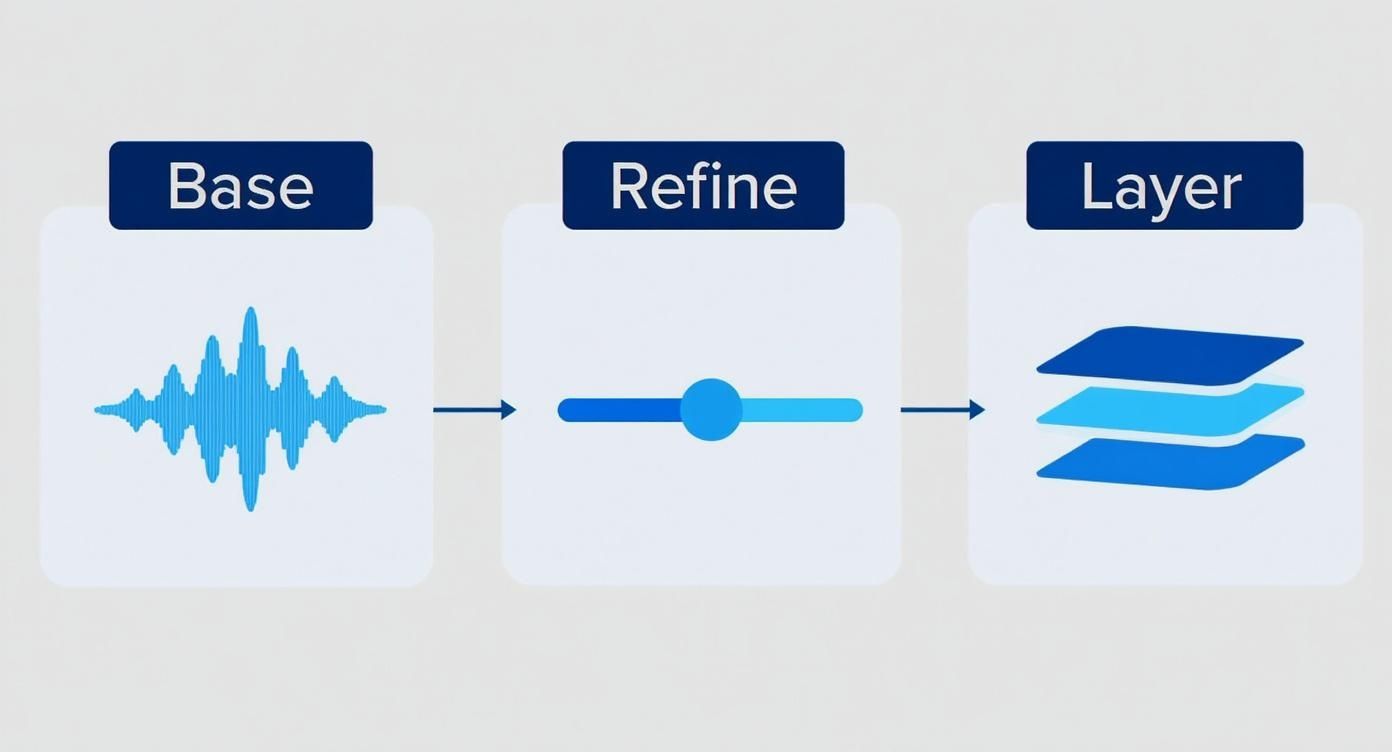
Think of it as sculpting. You begin with a rough idea and refine it until it’s a finished piece that fits perfectly.
For a financial app, everything has to communicate security, speed, and trustworthiness. The audio feedback needs to be professional, subtle, and almost unnoticeable. A loud or goofy click would feel totally wrong and might even make users question the app's credibility.
The goal here is a sound that simply confirms an action without being a distraction. We want something clean and high-frequency, suggesting efficiency.
A short, crisp click of a small plastic button being pressed, clean and isolated, no reverb.The end result is a click that you feel more than you hear. It’s a subconscious nod that an action was successful, reinforcing the app's sleek and professional vibe.
In a game, sound is all about feedback and immersion. When you’re crafting the user experience, every sound matters. For a deep dive into this topic, you can explore a comprehensive guide to modern game interface design which covers these principles extensively.
Now, for a weapon reload, the click needs to be satisfying. It has to feel chunky and impactful.
Unlike the banking app, this sound needs weight and personality. It should sound mechanical and powerful, adding to the game's atmosphere.
The metallic latch of a heavy steel ammo box clicking shut, with a slight resonant echo.The sharp mechanical snap of a rifle bolt locking into place.This layering creates a sound effects click that has a sharp, metallic bite upfront followed by a weighty, resonant body. That's a combo that feels incredibly rewarding for the player.
The right sound in a game doesn't just inform the player; it rewards them. A satisfying click can make a simple action like reloading a weapon feel powerful and engaging, boosting player immersion.
When you're making a tutorial video, clarity is king. The mouse click sound has to be distinct enough to signal exactly when and where an action is happening. But you also don't want it to be so sharp that it gets annoying after a few minutes.
This is a balancing act between presence and subtlety. The sound needs to cut through any background music or narration without being harsh on the ears. If you want to learn more about mixing audio elements, we have a whole guide on using sound effects in video editing.
There's a huge demand for this kind of custom audio. The sound effect service market, which covers everything from multimedia to VR, was valued at around USD 2.4 billion in 2024. Projections show it hitting nearly USD 4.5 billion by 2035. Just the video game segment alone is expected to grow from USD 900 million to USD 1.6 billion in that time. It's a clear sign that getting the sound right is more important than ever.
You've layered, tweaked, and polished your sound to perfection. Now, how do you get that pristine audio out of your editor and into the world? Exporting your custom sound effects click is the final, crucial step, and it's about more than just hitting "Save."
Think of it this way: you need a master copy and a delivery copy. For your master file—the one you'll archive and come back to if you ever need to make changes—always, always export it as a WAV file. It's uncompressed, so it holds every single bit of audio data. No quality loss, period.
When you're ready to actually drop the sound into a game, an app, or a video, that huge WAV file can become a liability. It can bog down loading times and eat up space. This is where compressed formats come in.
Here’s a quick rundown of your best bets:
My go-to workflow is exporting the master at a sample rate of 48kHz and a bit depth of 24-bit. From there, I'll create delivery versions in OGG or AAC, depending on the project's needs. If you want to really get into the weeds of these formats, our guide on what an audio file format is is a great resource.
This is where using a tool like SFX Engine really shines. You get to skip all the legal headaches.
The most important licensing takeaway is this: sounds you create with an AI tool like SFX Engine are typically 100% royalty-free for both personal and commercial use. This means you can use them in your projects without worrying about ongoing fees or complicated legal agreements.
This freedom is a huge deal. It means you can build a massive library of unique sounds for your own work, or even package them up to sell. If you’re thinking about that route, learning how to sell digital products effectively can help turn your sound design skills into a real business.
Of course, it’s always smart to give the terms of service a quick read, but the entire model is built to let you create and use your sounds without limits.
When you first start designing click sounds, a few questions always seem to come up. I've been there myself. Getting these sorted out early will save you a lot of headaches and help you sidestep some common rookie mistakes. Let's dig into a couple of the most frequent ones.
The first thing people usually ask about is the technical side of things, specifically which audio format to use. This decision really matters, since it affects both sound quality and how fast your app or website loads. Every kilobyte counts.
For your original, master sound file, always go with a high-quality, uncompressed format. WAV is the industry standard for a reason. Think of it as your high-resolution source file—you want it to be as clean and detailed as possible.
I recommend working with 48kHz, 24-bit WAV files. This captures more than enough detail for a short sound like a click.
But for the final product that actually goes into your project, that big WAV file is overkill. For web and mobile applications, you'll want to use a compressed format to keep file sizes down and loading times snappy.
Here are my go-to choices:
My workflow is always to export a separate, compressed version for delivery. The key is to find that perfect balance where the file size is tiny, but you can't hear any obvious drop in quality.
Nothing screams "amateur sound design" more than hearing the exact same click sound on repeat. It can get annoying for users, fast. The pro move here is to introduce subtle variations.
To avoid listener fatigue, create 3-5 slightly different versions of your main click sound. When implemented, these can be programmed to play randomly, making the user interface feel more alive and natural.
Creating these variations is pretty straightforward. Just take your master click and tweak it slightly. You could adjust the pitch a tiny bit, trim the length by a few milliseconds, or even swap out one of the layers for an alternative.
The changes should be so small that you barely notice them individually. But when they're played back in a random sequence, they create a much more organic and polished experience for the user.
Ready to stop searching for the perfect click and start creating it? SFX Engine gives you the power to generate endless, unique, and royalty-free sound effects with just a few words. Sign up for free and start designing your signature sounds today!
