December 15, 2025 · Kuba Rogut

Finding the right sound effects for your phone app might seem like a minor detail, but it’s often the secret ingredient to a polished, professional user experience. These aren't just simple alerts; they are the audio signposts that confirm actions, delight users, and ultimately build your app’s sonic identity.
Have you ever used an app where a sound just feels perfect? That satisfying "swoosh" when you send a message or a subtle "click" when you toggle a switch? That’s no accident. High-quality, custom audio is what elevates a good user interface into a great one, making the entire experience more intuitive and memorable.
In a marketplace packed with millions of apps, unique audio helps you cut through the noise. Think about the iconic sounds from apps you use every day—they're just as recognizable as the visual logo. Using generic, stock sounds can make an otherwise brilliant app feel cheap or uninspired.
This need for better audio isn't just a hunch; the market data backs it up. As phone hardware gets more sophisticated, so do user expectations. The global market for mobile phone loudspeakers was valued at USD 7.21 billion and is projected to hit USD 11.32 billion by 2032. This surge is driven by people wanting better sound for gaming and media, which naturally raises the bar for app sounds too.
What does this mean for developers and designers? It means audio is no longer an afterthought. The goal is to create sounds that are not just pleasant, but also perfectly functional and optimized for small speakers.
Every sound in your app contributes to its personality. Do you want it to feel playful and fun, or sleek and modern? Deciding on this sonic identity from the get-go is critical.
Key Takeaway: A cohesive set of custom sound effects reinforces your brand, gives users clear feedback, and makes your app feel more responsive and alive. It's a direct investment in the user experience that pays off in engagement and retention.
This guide is all about the practical, real-world methods for creating these essential audio assets. Whether you're diving into our guide to notification sound effects, experimenting with AI tools, or recording your own foley, professional sound design is absolutely within your reach. Find more inspiration and assets in our collection of notification sound effects.
Every killer sound effect starts with a solid ingredient. Before you can get to the fun part—the layering, mixing, and processing—you need a high-quality source file. Think of it as the foundation for everything that comes next. Thankfully, there are a few powerful ways to get these raw sounds, and each one opens up different creative doors for your app's audio.
The most talked-about method right now is, without a doubt, AI sound generation. With just a simple text prompt, you can dream up almost any sound imaginable, from a hyper-realistic thud to something totally abstract and sci-fi. This approach is insanely fast and flexible, letting you try out dozens of ideas without ever needing to set up a mic or patch a synthesizer.
AI tools are fantastic at turning descriptive language into actual audio, but the magic is all in the prompt. You have to be specific. Instead of just asking for a "success sound," you can steer the AI to create something that perfectly matches your app's vibe. If you're curious to see just how deep this rabbit hole goes, there's a great guide on using a free AI audio generator that walks you through the whole process.
The trend toward AI-driven content is exploding, and it's not just for audio. Look at what's happening in video generation.
This image, generated by OpenAI's Sora model, shows how incredibly detailed and professional AI-generated content can be. The same principles apply to audio: the more specific and creative your direction, the better the final result.
So, how do you write a great prompt to get the best sound effects for your phone? Try to include these elements:
Putting it all together, a prompt like "a crisp, satisfying, bubbly pop sound for a success notification, with a slight digital reverb, under one second" is going to give you something way more useful than just "pop sound."
Another one of my favorite methods is Foley—the art of making sounds with everyday objects. This hands-on approach is perfect when you want to add a bit of organic, real-world texture to an otherwise digital interface. You really don't need a fancy studio; your phone's microphone and a quiet closet can get you surprisingly far.
Pro Tip: When you're recording Foley, always grab a few different takes. Record some loud, some quiet, some close to the mic, and some far away. This variety gives you a ton of creative options when you get to the editing stage.
Here are a few ideas to get your creative juices flowing:
If you're after those clean, modern, and distinctly digital UI sounds, nothing beats synthesis. Using a Digital Audio Workstation (DAW) like Ableton Live or FL Studio, you can build sounds from the ground up using basic waveforms like sine, square, or triangle waves. This gives you absolute control over every piece of the sound, from its pitch and tone to how quickly it starts and fades out.
For example, a simple, short sine wave with a rapid pitch-down envelope can become the perfect little "bloop" or notification tone. Synthesis isn't about recreating reality; it’s about crafting a sound that just feels right for a digital action.
Here's a quick breakdown to help you decide which method might work best for you.
This table compares the main ways to generate your raw sound effects, highlighting their strengths, weaknesses, and where they shine in mobile app development.
| Method | Pros | Cons | Best For |
|---|---|---|---|
| AI Generation | Extremely fast, versatile, great for brainstorming, no equipment needed. | Can be unpredictable, quality varies, may lack organic feel. | Rapidly prototyping unique UI sounds, abstract alerts, and sci-fi effects. |
| Foley | Authentic, organic, unique textures, highly creative and fun. | Requires a quiet space and microphone, can be time-consuming to get right. | Realistic interactions, tactile feedback sounds (clicks, swipes, crinkles). |
| Synthesis | Complete control, clean and precise, perfect for digital/UI sounds. | Can sound sterile if not done well, requires some knowledge of a DAW. | Modern UI notifications, futuristic alerts, and minimalist sound palettes. |
Playing around with these three methods will give you a library full of unique, custom raw materials. Once you have a collection of sounds you're happy with, you'll be ready for the next stage of production.
A single sound rarely has the weight or complexity to feel truly satisfying. The real magic in creating memorable sound effects for phone apps happens when you start layering different audio elements together. This is how you transform a simple noise into an emotionally resonant experience.
Think about crafting a classic "level up" sound. A lone chime might sound thin and uninspired. But by stacking multiple, distinct sounds, you can build something far more impactful and rewarding for the user. It's a process of sonic storytelling, where each layer adds a new dimension.
Let's walk through a real-world scenario. Imagine you need a short, rewarding sound for when a user accomplishes a goal. In your Digital Audio Workstation (DAW), you’d bring in a few different raw sounds that each serve a specific purpose.
By combining these three distinct elements, you've created a sound effect that is far richer and more engaging than any single component could be on its own.
The art of sound design is often about illusion. By carefully layering sounds, you create a new, singular experience that feels cohesive and intentional, guiding the user's emotional response to an in-app action.
Creating these layered effects is more accessible than ever, thanks to the explosion of mobile-native audio creation tools. The global smartphone music production software market was valued at around USD 92.6 million and is projected to reach approximately USD 191.0 million by 2032.
This growth is lowering technical barriers, allowing more creators to design phone-optimized effects directly on their devices. You can explore more insights about this growing market on Fortune Business Insights.
The flowchart below breaks down the primary ways to generate your initial sound sources before you even start the layering process.
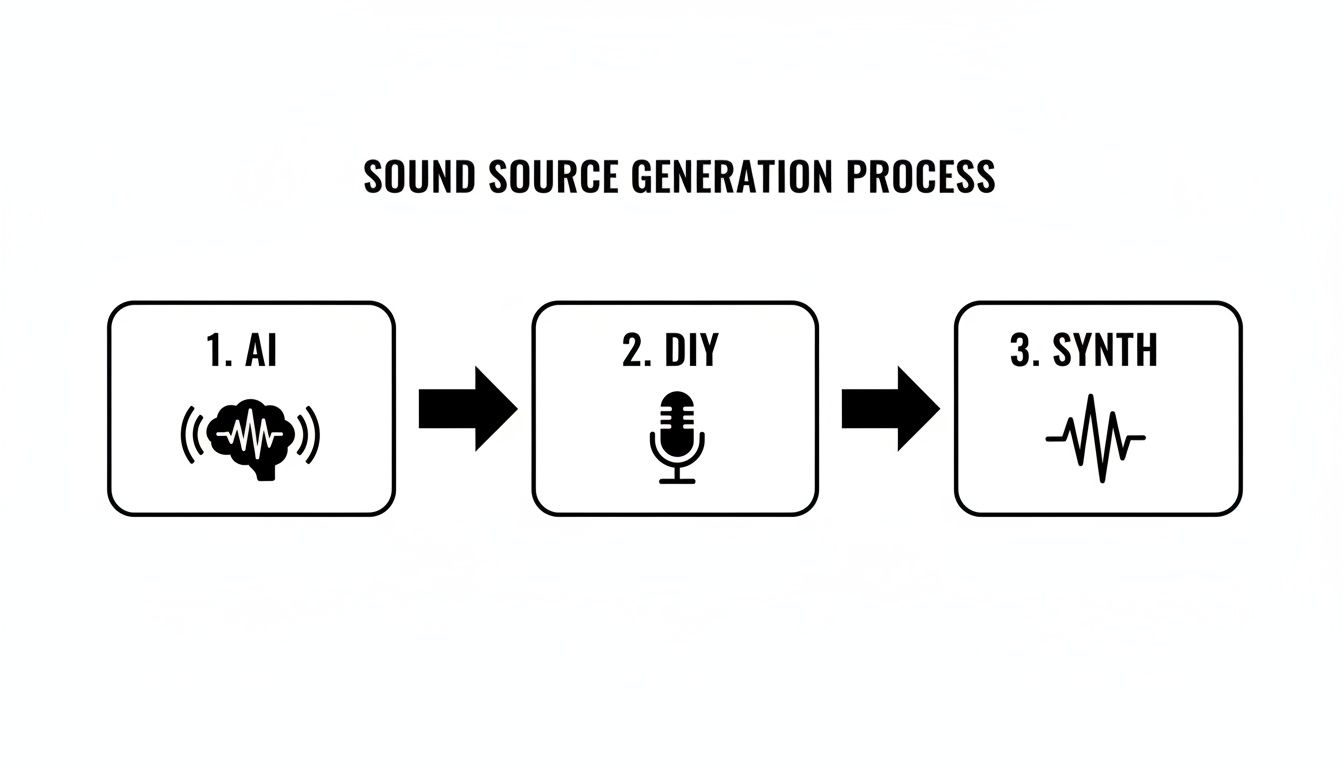
This workflow shows how AI, DIY foley, and synthesis provide the raw ingredients needed for powerful, layered sound design.
Once your sounds are stacked in your DAW, the next job is refinement. Tweak the timing of each layer so they sync perfectly—perhaps the whoosh leads into the chime by a few milliseconds to build anticipation.
Use volume automation to control the dynamics, ensuring each element has its moment to shine without overpowering the others. For more advanced techniques, you can explore our detailed guide on how to make sound effects from scratch. This is where you truly sculpt the sound into a polished, professional final product.
What sounds incredible and full-bodied on your studio monitors can completely fall apart on a tiny phone speaker. A booming explosion might turn into a weak, tinny crackle. This is the core challenge we face when mixing for mobile devices—it's not about making a sound perfect in an ideal listening environment, but making it work on the limited hardware everyone actually uses.
You have to think less about creating a massive, cinematic sound and more about ensuring it’s clear, present, and doesn't distort when played through a speaker the size of a thumbnail. It’s a game of translation, and it requires a few specific tricks.
Your most important tool here is equalization, or EQ. Let's get one thing straight: phone speakers can't reproduce deep bass. It's just not physically possible. Any sound energy you have hanging around below 200-300 Hz is basically just wasted data that can muddy up the mix and cause the tiny speaker cone to distort.
The very first thing I do is slap on a high-pass filter (HPF). Think of it as a bouncer for your sound, kicking out all the low-end rumble that can't get into the club anyway. By carving out that useless bass, you immediately create more headroom and allow the important frequencies to shine through.
With the low-end cleaned up, we can focus on where phone speakers live and breathe: the mid-range.
Next up is compression. A compressor is like an automatic volume knob—it turns down the loudest peaks and brings up the quietest parts of your sound. This helps create a more consistent and even audio experience, which is absolutely vital on mobile where users might be in a noisy coffee shop or on a quiet train.
Take a simple "swoosh" sound. It might have a loud, punchy start and a long, quiet tail. Without compression, a user might only hear the initial whoosh and miss the rest. A compressor evens it out, making sure the entire sound is audible from start to finish without any part being obnoxiously loud.
A bit of subtle compression can make your sounds feel instantly more polished and professional. The goal isn't to squash the life out of your audio, but to gently control its dynamic range so it remains clear and impactful on small speakers.
Finally, you need to make sure all your sounds play well together. Nothing screams "unprofessional" like having one button click that’s barely audible and a notification sound that blasts the user’s eardrums. We need consistency.
For this, we move beyond simple peak volume and start thinking in terms of perceived loudness, measured in Loudness Units Full Scale (LUFS). By normalizing all your sound effects to a consistent target—say, around -16 LUFS—you guarantee that no single sound will feel out of place. This simple step creates a cohesive audio experience across your entire app, making every interaction feel intentional and well-designed.
You've done all the fun creative work—designing, layering, and mixing your sounds. Now comes the final, technical step: exporting. Don't gloss over this part. The wrong settings can completely undermine your efforts, leading to poor quality, bloated file sizes, or frustrating compatibility problems.
Getting your export settings dialed in ensures the audio you perfected on your workstation sounds just as good on a user's device. It all starts with choosing the right file format. This is really a balancing act between pristine, uncompressed quality and lean, compressed efficiency.
Uncompressed formats like .WAV and .AIFF are the gold standard for quality. They are a bit-for-bit perfect copy of your audio, which makes them ideal for sounds that need to loop flawlessly, like background music or ambient soundscapes. The downside? The file sizes are huge, which can seriously inflate your app's download size and slow down loading times.
This is where compressed formats come in. They are much smaller and are the workhorse for most UI sounds.
The need for well-optimized audio is a massive deal. The global market for sound effect services hit an estimated USD 2,538.9 million in 2024 and is on track to reach USD 4.50 billion by 2035, with mobile apps and games fueling a huge part of that growth. This just goes to show how vital high-performance, correctly formatted audio really is. You can dig into more data on the sound effect service market if you're curious.
To get the best performance, it's smart to cater your format choice to the operating system you're targeting. This ensures you won't run into weird compatibility bugs and that your sounds play back as efficiently as possible.
My go-to for Android is almost always .OGG (Ogg Vorbis). It provides fantastic quality at surprisingly low bitrates, giving you tiny files that are perfect for snappy UI feedback. On the iOS side, .CAF (Core Audio Format) with an IMA4 codec is a brilliant, highly optimized choice.
Beyond the format itself, a few core technical settings should be your default for any sound effects for phone apps. If you stick to these, you'll sidestep most of the common playback headaches.
By being deliberate about your format and locking in these settings, you guarantee that every click, pop, and whoosh you designed sounds exactly as you intended, on every single device.
If you're just dipping your toes into mobile audio design, you've probably got a few questions. It's a common scenario—whether you're a developer trying to add that final layer of polish or a designer chasing the perfect user experience, getting the right answers can save you a world of headaches. Let's dig into some of the most frequent questions I hear.
This is easily one of the biggest questions. There's no magic volume knob setting that works for every sound. Instead of just looking at the peak volume, professionals think in terms of perceived loudness, which we measure in Loudness Units Full Scale (LUFS).
A great starting point is to normalize all your sounds to a consistent target, like -16 LUFS. This one step makes a huge difference. It stops a quiet little tap sound from being followed by a blaring notification, a classic mistake that can make an otherwise great app feel cheap and unprofessional.
This one is a minefield. The short answer is: it all comes down to the license. Just because a sound is online and downloadable doesn't mean it's free for you to use in your app, especially if it's a commercial project. Using copyrighted audio without the proper rights can land you in serious legal (and financial) hot water.
You need to be diligent about this. Only use sounds that are explicitly cleared for commercial use. Look for Creative Commons licenses like CC0 or stick to reputable royalty-free libraries.
Crucial Tip: Never, ever assume a sound is free to use. Always double-check the license before it goes anywhere near your project. It's on you to make sure every single audio file in your app is legally compliant.
Of course, when you make your own audio or use a tool that hands you a full commercial license, you get to sidestep this whole mess. That peace of mind is priceless.
From a creative standpoint? Not really. A good sound is a good sound, no matter what phone it's playing on.
Technically, though, it's a different story. For the best performance, you'll likely want to export your audio in different file formats. As we touched on earlier, .OGG is a fantastic, efficient choice for Android, while iOS tends to prefer .CAF files. Taking the time to create platform-specific exports keeps your app nimble, your file sizes down, and your audio playback snappy.
Not at all. In fact, simplicity is your best friend on mobile. A clean, short, and distinct sound almost always beats something long and overly produced. The goal is to provide clear, immediate feedback, not to create a mini-symphony for every button tap.
The best mobile sounds do their job in under a second and then get out of the way.
Ready to create unique, high-quality audio for your next project without worrying about licenses? SFX Engine offers a free AI-powered sound effect generator that gives you full commercial rights to every sound you create. Start designing your perfect audio today at https://sfxengine.com.
