Dog Toy Noises: Master dog toy noises for games and film
Learn to craft realistic dog toy noises for games and film with practical SFX techniques, layering, and AI-assisted tips that actually sound convincing.
Kuba RogutPublished 15 min read
Have you ever noticed how a perfectly timed squeak or crinkle in a movie makes a scene with a pet feel instantly real? Those authentic dog toy noises are a secret weapon for sound designers. They’re not just background filler; they're tiny, crafted audio moments that build emotional connection and pull an audience deeper into the story, whether it’s for a film, video game, or commercial.
Why Realistic Dog Toy Noises Matter in Media
It all comes down to immersion and believability. A well-designed sound effect can make an on-screen animal feel like a living, breathing character. As a sound designer, getting these specific textures right is a surprisingly valuable skill. It’s the difference between a character’s pet feeling like a prop and feeling like a member of the family.
This is the kind of work we'll be doing—taking simple ideas and turning them into professional-grade audio with tools like SFX Engine.
The setup above is a great example of how modern sound design works. We can now generate incredibly detailed and unique soundscapes from a simple text prompt, which is exactly what this guide will teach you to do.
The Growing Demand for Authentic Audio
The need for high-quality, specific audio like this isn't just an artistic preference; it's driven by a massive market. The pet industry is booming, and the interactive toys that squeak, crinkle, and crunch are a huge part of that growth.
The global dog toys market was valued at USD 4.13 billion in 2026 and is on track to hit USD 7.67 billion by 2034. That explosion in physical products creates a direct need for their digital counterparts. More pet-focused movies, games, and ads mean a greater demand for convincing dog toy noises.
A generic, uninspired sound effect can break an audience's immersion instantly. The difference between a stock squeak and a custom-designed one is the difference between an amateur project and a professional production.
What You Will Learn in This Guide
Think of this tutorial as your complete roadmap, taking you from basic concepts to advanced, pro-level techniques. We're getting hands-on from the start. If you're completely new to this world, you might want to first get a foundational understanding of the craft by reading our guide on what Foley sound is.
Here’s a quick look at the core sound categories and the techniques we’ll use to create them, giving you a roadmap for this guide.
Decoding Dog Toy Sound Design
| Sound Category | Common Descriptors | Primary Design Technique |
|---|---|---|
| Squeaks | High-pitched, rubbery, short, air pressure | AI generation, pitch shifting, transient shaping |
| Crinkles | Plastic, crunchy, sharp, rustling | Layering, EQ, high-frequency emphasis |
| Impacts/Chews | Thuds, rubbery impacts, gnawing, tearing | Convolution reverb, distortion, multi-layered foley |
This table maps out our journey. We'll start by breaking down the acoustic DNA of these common sounds. Then, you'll learn to write effective prompts in SFX Engine to generate unique base layers.
From there, we'll dive into the real magic: processing your sounds with layering, EQ, and other effects to give them that polished, professional finish. Finally, I'll share some tips on how to integrate your custom sounds seamlessly into your projects. By the end, you'll be able to create custom dog toy noises that bring authenticity and character to any project you tackle.
Deconstructing the Sounds Dogs Love
Ever wonder what makes a dog go absolutely bonkers for one toy but ignore another? A lot of the time, it comes down to the sound. Before we can even think about creating these sounds, we have to become experts at listening to them.
The most popular dog toy noises really boil down to three core types. Each one has a distinct sonic personality that taps into a dog's instincts, whether it’s curiosity or their natural prey drive. Getting a feel for these sounds is the first step to writing effective text prompts that will generate exactly what you need.
Breaking Down the Squeak
The squeak is the quintessential dog toy sound. At its core, it’s just a quick blast of air forced through a tiny opening, but the magic is in the details.
- Pitch & Character: Think about the pitch. Is it that high-frequency, sharp squeal from a small latex ball, or the lower-pitched, almost wheezing groan from a huge rubber toy as it gets squashed?
- Attack & Fade: How fast does the sound hit? A quick, sharp attack is what grabs a dog’s attention, making it sound urgent. A slower attack can feel more like a gasp. The decay, or how long the sound lingers, is just as important.
- The Toy’s Material: The squeaker's housing completely changes the sound. A squeaker buried inside a dense, heavy rubber toy will sound muffled and deep, while one inside a thin vinyl toy will be bright and direct.
Crafting the Perfect Crinkle
That crinkly, rustling sound taps directly into a dog's instinct, mimicking the sound of a small creature scurrying through leaves. This noise is all about creating a sense of sharp, chaotic texture with a lot of high-frequency detail.
A crinkle sound isn't monolithic. It's a rapid succession of tiny, sharp transients. Think of it as hundreds of tiny snaps and rustles happening at once, creating a sense of chaotic energy that dogs find irresistible.
When you're designing a crinkle, think about what's making it. The thin, sharp rustle of a plastic bag being crushed is a world away from the stiffer, louder crunch of a water bottle. Is the crinkle material stuffed deep inside a plush toy, or is it right on the surface? Each choice creates a completely different experience.
And if you want to explore the wider world of canine audio, we have a whole guide on creating a realistic dog sound effect in our other guide.
The Weight of Chews and Impacts
Finally, we have the sounds of physical interaction—the thuds, the gnaws, the rubbery stretches and scrapes. These are your foley elements, the sounds that add weight and realism to the toy. They tend to be lower-frequency and are defined by the toy's physical makeup.
For example, a hollow rubber ball hitting a hardwood floor gives you a unique, resonant "thump." Compare that to the dull, solid thud of a nylon bone being dropped. Chewing sounds add another layer of complexity, bringing in elements of tearing, stretching, and scraping that make the interaction feel real.
Generating Your Base Sounds with AI Prompts
Alright, you've done the prep work and know what a dog toy should sound like. Now for the fun part: actually making those sounds. We're going to feed some highly specific text prompts into an AI tool like SFX Engine to build our initial library of dog toy noises.
This is where detail is everything. Just asking for a "squeak" will get you something generic and forgettable. The real magic happens when you get descriptive. Compare "squeak" to "a sharp, high-pitched squeak from a small latex ball, short decay." The difference is night and day. One is a sound; the other has a story and a physical presence.
And that detail pays off. Seriously. The global pet toys market is no joke—it's expected to grow from USD 4.7 billion in 2026 to a massive USD 9.3 billion by 2036. With dogs making up more than half of that market, creating authentic digital sounds isn't just a creative exercise; it's a huge commercial advantage. You can dig into more of these trends over at Future Market Insights.
Crafting Effective Prompts
I always tell people to think like a director giving an actor a scene. You wouldn't just say "be sad"; you'd give them context and motivation. It’s the same with AI prompts. A solid prompt for any dog toy sound usually includes three key ingredients:
- The Action: What's physically happening? Think squeezing, crinkling, chewing, or being dropped.
- The Object: What's making the noise? Be specific. Is it a hollow rubber ball or plastic wrap inside a plush toy?
- The Quality: What does it sound like? Use descriptive words like high-pitched, muffled, rapid, or short decay.
When you nail this combination, you get a huge variety of source material to work with. Every sound has its own distinct character right from the start. If you want a deeper dive, check out our guide on how to create sounds with SFX Engine.
Prompt Examples for Different Dog Toy Noises
Let’s get practical. Here are a few prompts I’ve used that you can tweak for your own projects.
For Squeaky Noises:
A quick, high-pitched squeak from a small vinyl dog toy, very short and sharp.A low, wheezing groan from a large, heavy rubber chew toy being slowly compressed, with a long air release.
For Crinkle Textures:
The sharp, rustling crinkle of stiff plastic sheeting being crumpled inside a canvas dog toy.A soft, muffled crinkle from within a thick plush fabric, less sharp and more subdued.
Here’s what you’ll see in the SFX Engine interface when you start plugging these in.
The layout is clean and simple. You type in your prompt, hit generate, and immediately get visual feedback from the waveform. It makes the whole process incredibly intuitive.
Your initial generated sound is the raw clay. It doesn't need to be perfect right away. The goal at this stage is to create a diverse palette of high-quality, distinct sounds that you can later shape and refine into a polished final product.
From here, you can start playing with the built-in parameters. Try shortening a squeak's duration or toggling the variation slider to get slightly different takes from the same prompt. This is how you quickly build a robust library of source audio, all ready for the next stage of processing and polishing.
Layering and Processing for a Professional Polish
Getting a raw sound from a prompt is a great first step, but the real magic happens inside your Digital Audio Workstation (DAW). This is where we move from a basic audio file to a believable piece of foley. Let's take those generated sounds and polish them by layering, shaping, and adding the little imperfections that make dog toy noises sound real.
A single AI-generated sound will almost always feel a bit thin. The trick to a full, authentic sound has always been layering. Think about a real "chew" sound—it's not just one event. It’s a messy combination of a rubbery impact, maybe a hint of a tearing texture, and even the subtle whoosh of the dog's breath. By generating these elements as separate sounds and then stacking them in your DAW, you can build a composite sound with incredible depth.
This workflow, from the initial idea to the final refined asset, is central to modern sound design. It’s a simple loop: you start with a descriptive prompt, generate the core audio, and then refine it with processing until it’s perfect.
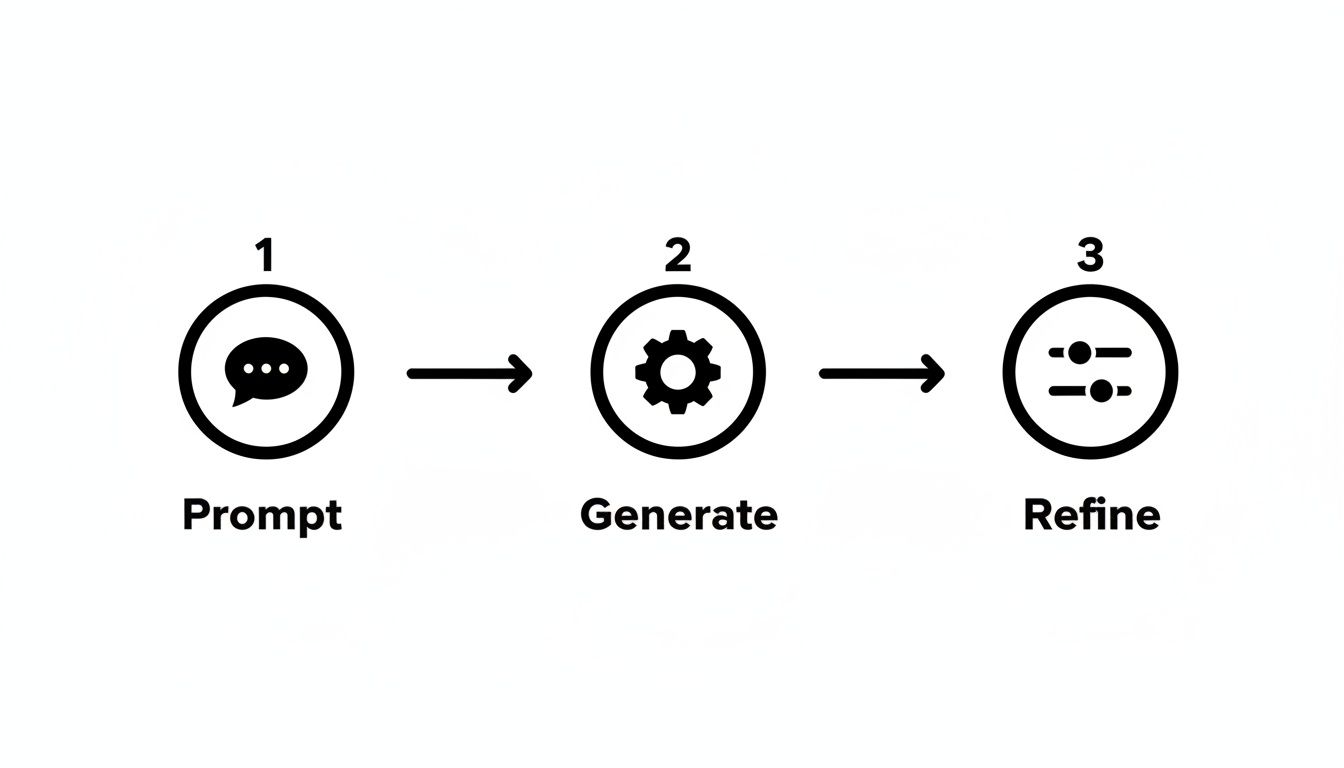
As you can see, that refinement stage is where you’ll spend most of your time, using a few key techniques to make sure the final sound sits perfectly in your project.
Shaping Sounds with EQ and Transients
Your Equalizer (EQ) is the main sculpting tool in your arsenal. For a squeak, I’ll often start with a high-pass filter to chop out any low-end mud that doesn't belong. Then, a gentle boost somewhere in the 2-5 kHz range can really emphasize its sharp, piercing quality, helping it cut through the mix without becoming harsh.
For crinkle and crunch sounds, a transient shaper is your best friend. This plugin lets you dial up the "attack," which is that initial sharp crackle of the sound. Pushing the attack on a crinkle layer makes it feel much crunchier and more detailed, just like scrunching up stiff plastic.
To get the cleanest audio for this stage, especially if you're mixing AI sounds with your own foley recordings, a quiet space is absolutely essential. Good sound studio soundproofing can be a game-changer for the quality of any elements you record yourself.
Adding Realism with Modulation and Distortion
One of the dead giveaways of a generated sound is perfect repetition. In the real world, no two squeaks are ever exactly the same. To fight that robotic feeling, I use just a touch of pitch modulation. A subtle LFO (Low-Frequency Oscillator) mapped to the pitch will introduce tiny, random variations that make every single sound unique.
Don’t be afraid to add a little grit. A brand-new toy sounds very different from one that's been a dog's favorite for weeks. A bit of saturation or light distortion can add warmth and a "worn-in" character that makes the sound far more believable.
This kind of detail is more important than ever. The interactive dog toy market is booming, projected to grow from $2.5 billion in 2026 to $4.2 billion by 2033. High-quality, engaging sounds are in high demand, especially when studies show that sound-emitting puzzle toys can increase a dog's mental stimulation by up to 40%.
Here are a few common processing chains I use for different toy sounds:
- Sharp Squeak: EQ (High-Pass Filter, High-Frequency Boost) -> Compressor (to even out the dynamics) -> Pitch Shifter (for random variation).
- Plastic Crinkle: Transient Shaper (to boost the attack) -> EQ (to add high-end crispness) -> Stereo Widener (to give it space).
- Rubber Chew: Saturation (for a little warmth and grit) -> EQ (to carve out any muddiness) -> Convolution Reverb (to place it in a physical space).
By combining these simple techniques, you’re no longer just generating audio. You're truly designing it, crafting custom sounds that bring genuine character and believability to your project.
Integrating Your Sounds into a Project
So you've built a solid library of custom audio files. That's a huge step, but the real magic happens when you start making them work together in a scene. This is where you shift from sound designer to storyteller, using your dog toy noises to craft a believable performance.
Think of it as choreographing a tiny, audible story. A typical play session doesn't happen in a vacuum. It might kick off with a few frantic, high-pitched squeaks as a dog gets wound up. That could lead to the soft thump of the toy being dropped, followed by a series of wet, rubbery chew sounds, and maybe end with a gentle crinkle as the pup finally settles down. Each sound is a piece of the puzzle.
Avoiding Repetitive Audio
Nothing shatters the illusion of reality faster than the "machine gun" effect—hearing the exact same sound triggered over and over. This is a dead giveaway of lazy sound design. The only way to combat this is to have multiple variations for every single action.
When you’re generating your source sounds, aim to create at least 4-5 different versions of every squeak, chew, and impact. Even tiny shifts in pitch, duration, or intensity make a world of difference when the sounds are played in quick succession. This variety is what tricks the brain into perceiving the audio as organic and not a cheap loop.
The key to believable sound integration isn't just having good sounds; it's having a variety of good sounds. A listener's brain will instantly detect a repeated audio sample, but it will accept subtle variations as natural.
Mixing for Real-World Scenarios
How you mix and master these sounds depends entirely on where they'll end up. The context is everything.
In a video game, for example, your dog toy noises need to be punchy and distinct. They often serve as player feedback, so they have to cut through the chaos of background music and other effects. A little bit of compression can give them the presence they need to stand out.
A film or commercial requires a completely different approach. Here, it’s all about subtlety and realism. The sounds need to feel like they belong in the scene’s acoustic space. This usually means using reverb to match the room a character is in and carefully automating the volume so the toy supports the action without distracting from dialogue.
Taking your sounds from the digital world into a physical product is a whole other beast. If your goal is a commercial toy, understanding the ins and outs of manufacturing a singing plush toy is essential. The tiny, low-fidelity speaker in a plush doll will reproduce your sounds very differently than your studio monitors, and you have to design for that limitation from the start.
Understanding Your Sound Effect Licensing
So you’ve crafted the perfect dog toy sound effect. Now comes the big question: what can you legally do with it? Let's clear up the licensing side of things, because it's simpler than you might think.
Any sound you generate with SFX Engine, including all those custom dog toy noises, comes with a full commercial license right out of the box. This means you can confidently drop them into your films, video games, podcasts, or ads without looking over your shoulder for legal trouble down the road.
What Royalty-Free Really Means
You'll see the term royalty-free a lot, and it's crucial to understand. This doesn't mean the sound is free to create. It means that after you generate the sound, you own the license to use it forever without paying extra fees—or "royalties"—for each use. You pay for the generation, and that’s it.
Think of it this way: you have the green light to use your sound creations in unlimited commercial projects without any hidden costs. This straightforward approach cuts through the usual legal red tape, freeing you up to publish your work without a second thought.
This model is a game-changer for creators. It gives you both the legal security you need and the creative freedom you want.
Troubleshooting Your Dog Toy Sounds
When you're deep in a sound design session, it's easy to hit a wall. Certain problems crop up time and time again when trying to craft the perfect dog toy noise. Let's walk through some of the most common hurdles and how I get over them.
A classic rookie mistake is having every squeak sound exactly the same. It sounds robotic because it is. The secret is to bake in some subtle, random changes. A light pitch shifter or a gentle LFO (Low-Frequency Oscillator) mapped to pitch in your DAW is your best friend here. This little trick introduces those natural imperfections that make a sound feel real.
Another challenge is matching the sound to the toy's material. A thick rubber ball sounds nothing like a cheap, thin vinyl chew toy, right?
- For dense rubber: I usually start with a lower-pitched source sound. Then, in post, I'll add a touch of saturation for warmth and use an EQ to gently roll off the highest frequencies. This gives it that muffled, hefty character.
- For thin vinyl: You’re aiming for something brighter and more aggressive. Try boosting the upper-mid frequencies—somewhere around 2-4 kHz—with an EQ. This will really emphasize that sharp, almost brittle attack.
Why Do My Sounds Feel Flat?
If your effects just don't have any punch or life to them, the answer is almost always layering. It’s rare for a single generated sound to have the complexity of a real-world noise. Think about it: a dog "chewing" a toy isn't one sound. It’s a mix of a rubbery impact, a slight tearing texture, and maybe even a faint squeak all at once.
Don't be afraid to get messy with your layers. Combine a generated squeak with a recorded Foley sound of you squishing a water bottle. The fusion of AI-generated precision and real-world chaos often produces the most believable and engaging results.
This is how you build up a sonic texture with the richness and depth that a single file just can't deliver.
Ready to create your own professional, royalty-free sound effects? At SFX Engine, you can start generating custom audio from text in seconds. Get your free credits and start designing today.